Why LastPass is the Leading Password Manager in 2026
 By Jordan Midea
 Software
Keeping your digital life secure used to feel like a background task. Now it shapes how you log in, shop, work, and even communicate day to day. With dozens of accounts in play and cyber risks getting sharper, password managers have become part of the routine. LastPass defines that standard in 2026. It pairs strong encryption with a clean, intuitive interface and reliable access across devices. More than storing passwords, it gives users steady control over their digital identity, without slowing them down or adding friction.
Password Vault - Your Digital Safe That Actually Keeps Up 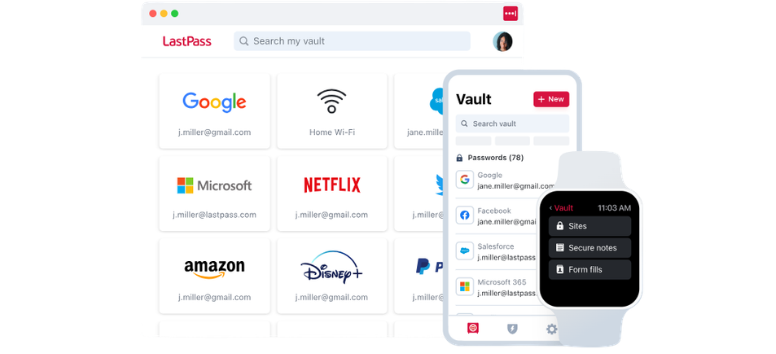
At the center of LastPass sits the password vault. Think of it as a secure home for everything tied to your online life, without the usual mess of trying to remember where things are. Once set up, it quietly collects your logins as you browse, or you can import them in minutes. From there, opening accounts, updating details, or sharing access feels quick and controlled.
Inside the vault, you’re not limited to passwords. It holds the details you reach for more often than you expect:
-
Payment details - Save your cards and check out without digging through your wallet
-
Personal records - Keep IDs, family details, and important numbers in one place
-
Shared access - Send login access safely without exposing the actual password
And when you think about the accounts that matter most, the vault keeps them within reach:
-
Banking - Secure your financial logins and keep them organized
-
Email - Protect the account that connects everything else
-
Social platforms - Store access to profiles filled with personal data
It’s less about storing passwords and more about keeping your digital life from feeling scattered.
If you’re tired of juggling logins or second-guessing where you saved something, setting up your LastPass vault is a simple place to start.
Save and Autofill - Faster Logins Without the Guesswork 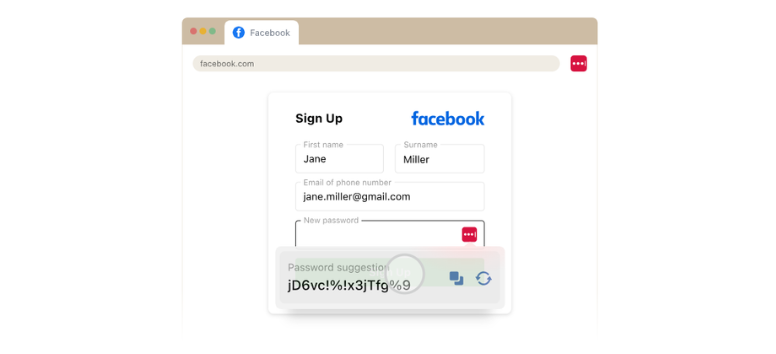
Typing passwords over and over gets old fast. LastPass takes that off your plate by saving your login details, payment info, and personal data the moment you enter them. The next time you visit a site, your information fills in instantly, so you move from login to action without slowing down.
It’s not just about speed. Autofill also helps you stay consistent and secure:
-
Less time typing - Login details and forms fill in automatically
-
Stronger passwords - Generate and store unique credentials without trying to remember them
-
Fewer mistakes - No more typos or locked accounts
Behind the scenes, the process stays simple and controlled:
-
Save once - Log in to a site, and LastPass offers to store your credentials in your encrypted vault
-
Tap to fill - On desktop or mobile, a quick click fills in your details
-
Sync everywhere - Your vault updates across devices, so access stays consistent wherever you log in
Autofill also goes beyond passwords, covering the details you use every day:
-
Credit cards - Speed through checkout when timing matters
-
Addresses - Fill forms for deliveries or subscriptions in seconds
-
Personal info - Enter names, emails, and numbers without repeating yourself
What makes it more reassuring is how it handles risk. LastPass prevents autofill on suspicious sites, helping protect your data from phishing and unsafe pages.
If logging in still feels like a chore or you find yourself reusing passwords just to keep up, enabling LastPass autofill can quietly change how you move online.
Passkeys - Password-Free Access That Just Works-https://www.lastpass.com/features/passkeys
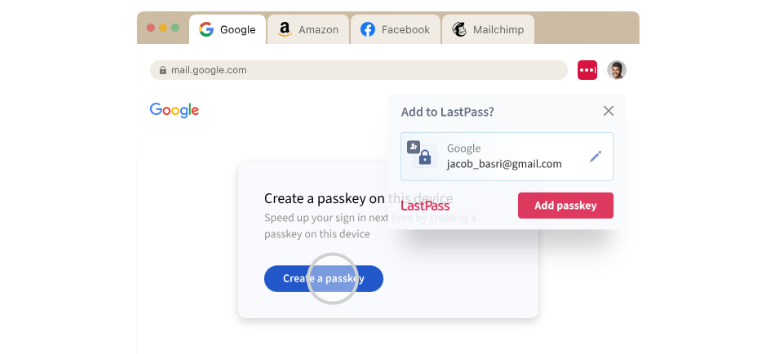
Passwords have carried online security for years, but they’ve also created friction. Passkeys simplify and secure that experience. With LastPass, you can create, store, and manage passkeys across your favorite apps and websites, giving you faster access without relying on memory or repeated inputs.
What makes passkeys stand out is how they handle security at a deeper level:
-
Stronger protection - Each login uses a unique credential that can’t be guessed, reused, or stolen
-
No phishing risk - There’s no password to intercept or trick you into revealing
-
Less fatigue - You don’t have to keep track of dozens of credentials
Behind the scenes, the system stays secure without adding complexity. Each login uses two keys. One stays with the website, and the other stays safely inside your LastPass vault. Even if a site gets compromised, your access remains protected because your private key never leaves your control.
Using passkeys feels familiar, just more streamlined:
-
Easy setup - Create and manage passkeys through the same LastPass app or extension
-
Access anywhere - Sync across devices and browsers without getting locked into one system
-
Simplified control - Manage credentials without worrying about resets or reuse
As more platforms move toward password-free sign-ins, passkeys are becoming part of the new standard. Start using passkeys in LastPass and move through your logins with less friction and more control.
Password Generator - Strong Passwords Without the Mental Load 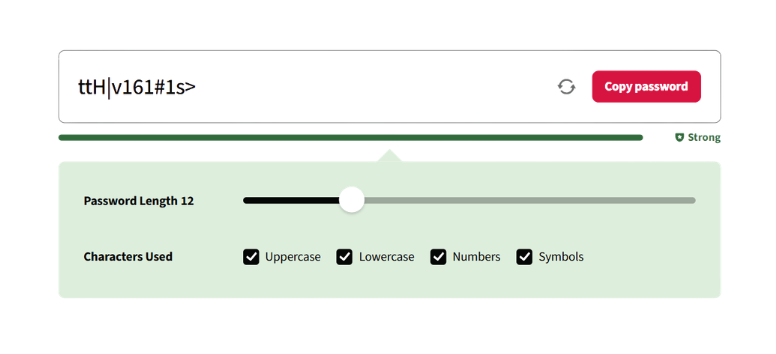
Coming up with secure passwords sounds simple until you’re doing it for every account. That’s where the LastPass password generator steps in. It creates strong, random passwords in seconds, so you don’t fall back on familiar patterns or reused logins.
Once generated, those passwords don’t just sit there. They become part of a system that works across your devices:
-
Instant creation - Generate secure passwords for new or existing accounts in one click
-
Saved automatically - Store them in your vault and access them anytime
-
Available everywhere - Sync across browsers, phones, and computers without extra setup
It also helps clean up habits that quietly weaken security over time:
-
Spot weak passwords - Identify reused or outdated credentials
-
Upgrade instantly - Replace them with stronger, generated ones
-
Reduce repetition - Stop relying on memory or slight variations
For teams and businesses, this shift matters even more. Strong password practices become easier to maintain, and the pressure on IT teams starts to ease as employees rely less on manual tracking.
Security layers build around that foundation:
-
Zero-knowledge encryption - Your data stays private, even from LastPass
-
Dark web monitoring - Get alerts when your data appears in breaches
-
Multifactor authentication - Add an extra step to protect your account
Start generating stronger passwords with LastPass and take the guesswork out of staying secure.
Username Generator - Smarter Usernames That Don’t Give You Away
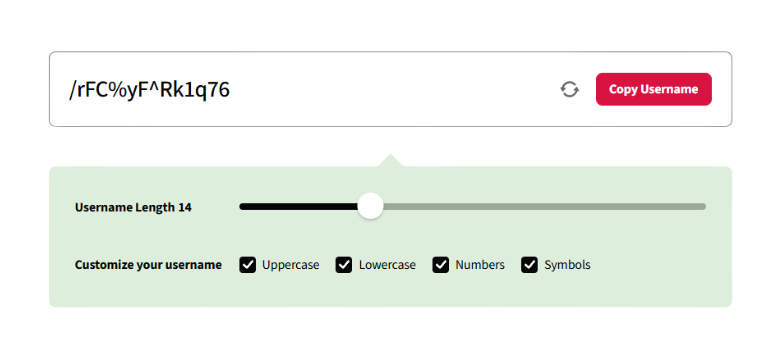
Usernames often get overlooked, yet they reveal more than people realize. Many users fall into the habit of reusing the same handle or adding personal details just to make it memorable. That small shortcut can open the door to unwanted attention or targeted attacks.
The LastPass username generator removes that guesswork. With one click, it creates random, unique usernames that don’t tie back to your identity, helping you stay less visible across platforms.
It works in a way that feels quick and flexible:
-
Instant generation - Create a unique username in seconds with a single click
-
Custom options - Adjust length or character types for more control
-
Fresh every time - Generate new variations without repeating patterns
What makes it useful goes beyond convenience. It helps avoid habits that quietly weaken your online presence:
-
No personal clues - Skip names, birthdays, or hobbies that reveal too much
-
No reuse across accounts - Keep each login separate and harder to trace
-
No predictable patterns - Avoid combinations that attackers can guess
When paired with LastPass, every new username can be stored alongside its password, ready for autofill whenever you log in again. That means less memorizing and fewer shortcuts that compromise security. Create a unique username with LastPass and keep your online identity a little harder to track.
Dark Web Monitoring - Stay Aware Before Problems Surface
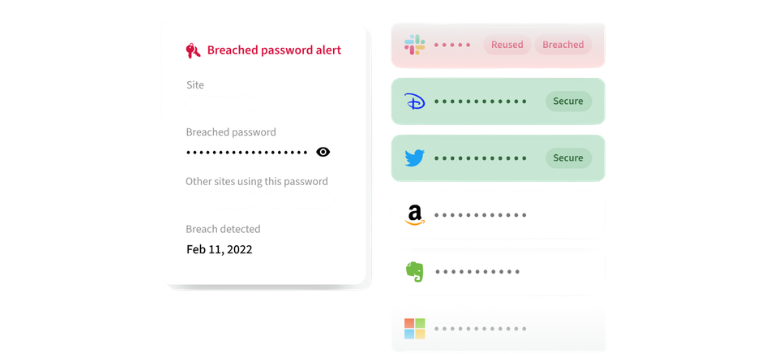
Most data breaches don’t make noise right away. Information can circulate quietly in hidden marketplaces long before you notice anything unusual. Dark web monitoring in LastPass keeps an eye on that space, so you’re not left guessing when your data has been exposed.
Once enabled, it works in the background without adding extra steps:
-
24/7 monitoring - Your information is checked continuously against databases of compromised credentials
-
Immediate alerts - Get notified the moment your data appears in a breach or leak
-
Early signals - Spot weak or exposed credentials before they turn into bigger issues
Getting started stays simple and controlled:
-
Set what to track - Add email addresses directly from your vault
-
Automatic checks - LastPass scans for matches behind the scenes
-
Real-time updates - Receive alerts so you can act without delay
This kind of visibility changes how you respond to risk. Instead of reacting after something goes wrong, you stay a step ahead and keep your accounts in check. Turn on dark web monitoring in LastPass and stay informed about your data before it becomes a bigger problem.
Security Dashboard - See What Needs Attention at a Glance- https://www.lastpass.com/features/security-dashboard
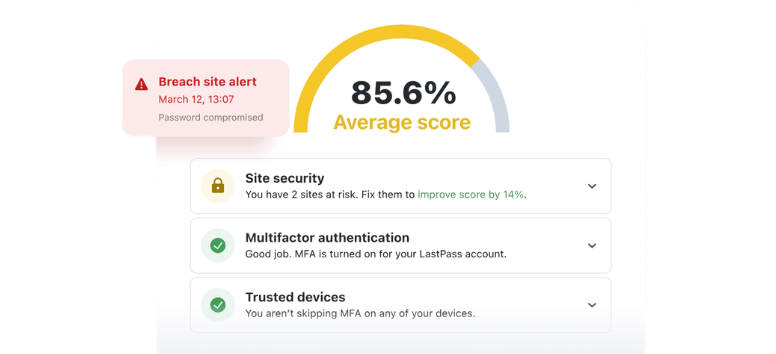
Managing passwords across dozens of accounts can get messy fast. The LastPass security dashboard brings everything into one clear view, so you know exactly where your risks sit and what needs fixing. It acts as your command center, showing weak, reused, or exposed credentials without digging through each account.
Inside the dashboard, your security status becomes easier to understand:
-
Password health overview - Spot weak and reused passwords in seconds
-
Breach alerts - See which accounts need immediate action
-
Central visibility - Keep all security signals in one place
One of the first things you’ll notice is your security score. It reflects the overall strength of your passwords and how well your account is protected. As you update weak credentials and tighten access, that score improves, giving you a simple way to track progress over time.
The dashboard also helps you take action without overthinking the process:
-
Guided updates - Replace weak passwords with stronger ones quickly
-
Ongoing monitoring - Track email exposure and security changes
-
Consistent improvement - Build better habits without starting from scratch
For teams and organizations, this view becomes even more valuable. Admins can monitor password practices, track security trends, and address risks across users, all from one place. Open your LastPass security dashboard and start tightening the areas that matter most.
Secure Credential Sharing - Share Access Without Giving It Away
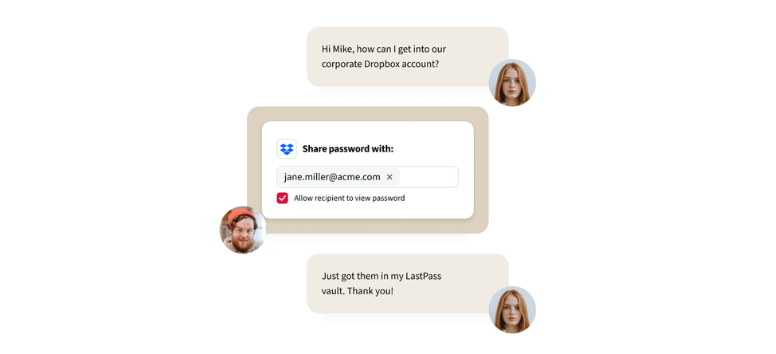
Sharing passwords often turns messy fast. Messages get lost, details get exposed, and control slips away over time. LastPass changes that by letting you share access without ever revealing the actual password, so sensitive information stays protected even when it’s in use.
At its core, sharing stays controlled and flexible:
-
No visible passwords - Grant access without exposing the actual login details
-
Full control anytime - Edit or revoke access directly from your vault
-
Organized sharing - Group accounts into folders for easier access
It also goes beyond simple logins, covering the details people tend to pass around:
-
Secure notes and documents - Share WiFi details, banking info, or important files safely
-
Family access - Keep shared accounts like streaming services organized
-
Flexible access - Decide who sees what and when
For teams and businesses, this becomes part of everyday workflow:
-
Project-based sharing - Assign access based on roles or tasks
-
Custom permissions - Control who can view or manage credentials
-
Instant updates - Adjust or remove access as team members change
Everything stays connected to your vault, so shared credentials remain secure while still easy to manage. It brings structure to something that usually feels scattered. Start sharing credentials through LastPass and keep access organized without losing control.
Personal Password Sharing - Simple Access for People You Trust 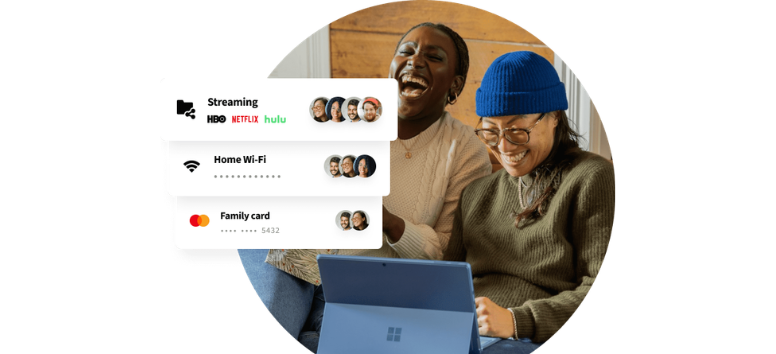
Sharing passwords at home or with close friends sounds easy until it starts getting messy. Messages get buried, access lingers longer than expected, and control fades over time. LastPass keeps that process clean by letting you share access securely, without passing around actual passwords.
It keeps things private while still making access easy:
-
Always encrypted - Your passwords stay hidden, even from the people you share with
-
Controlled visibility - Let others use logins without ever seeing the actual password
-
Easy access updates - Grant or remove access whenever needed
It also adapts to real-life situations where sharing changes over time:
-
Temporary access - Share WiFi or streaming logins for short stays
-
Household sharing - Keep family accounts organized and easy to manage
-
Group access - Send one set of credentials to multiple trusted users
For better organization, you can group logins into folders:
-
Category-based sharing - Bundle accounts like streaming, shopping, or utilities
-
Quick revocation - Remove access instantly when situations change
-
Auto-sync updates - Updated passwords reflect across all shared users
Sharing stays structured without turning into a long thread of messages or saved notes. Start sharing passwords with LastPass and keep access simple while staying in control.
Business Password Sharing - Controlled Access Across Teams and Workflows 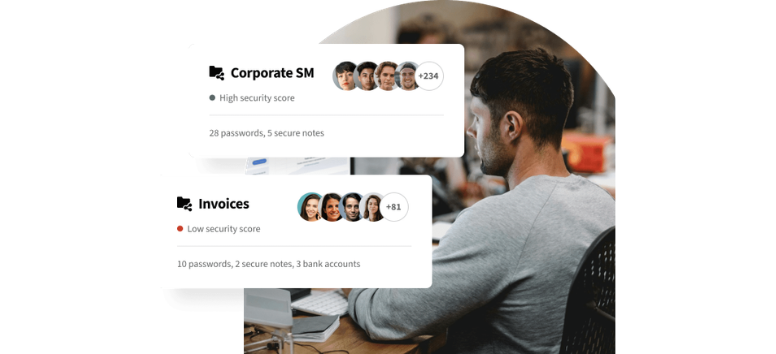
Sharing passwords at work often turns into a risk without anyone noticing. Credentials get passed through chat, reused across tools, or left accessible long after roles change. LastPass brings structure to that process, giving teams a secure way to share access without exposing sensitive information.
Sharing stays protected and trackable:
-
Encrypted sharing - No more sending passwords through email or messages
-
No plain text exposure - Team members access accounts without seeing actual credentials
-
Central control - Manage access from one place instead of scattered tools
It also supports how teams actually work across roles and projects:
-
Group-based access - Assign credentials by team, role, or project
-
Custom permissions - Control who can view, use, or manage shared items
-
Flexible sharing terms - Set access per user or per account
Visibility plays a big role in keeping things secure:
-
Activity tracking - Monitor access history and unusual behavior
-
Policy enforcement - Require strong passwords or added authentication
-
Ongoing oversight - Adjust permissions as teams evolve
Access can be temporary or long-term, depending on what the situation calls for:
-
Time-based sharing - Grant access for short-term work or external vendors
-
Instant revocation - Remove access as soon as roles change
-
Folder-level control - Share multiple credentials without exposing each one
Instead of relying on scattered communication, everything stays inside a controlled system that supports collaboration without weakening security. Start managing business password sharing with LastPass and keep access aligned with how your team actually works.
Automatic Device Sync - Your Passwords, Ready Wherever You Are https://lastpass.wo8g.net/oNn4qg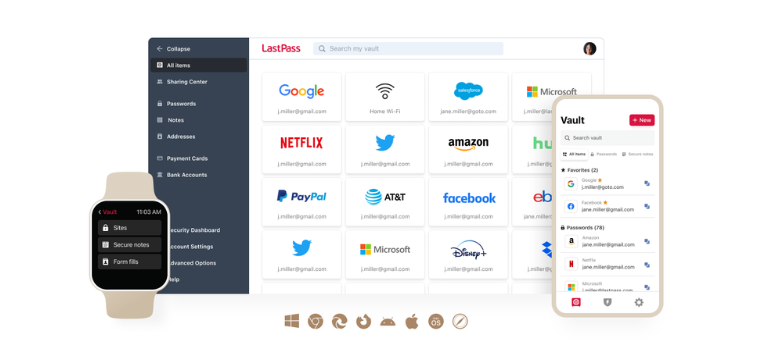
Passwords tend to scatter across devices without you noticing. A few are saved on your phone, some are written down at your desk, and others are tucked into notes or emails. It works for a while, until it doesn’t. LastPass keeps everything in one place and follows you wherever you log in.
Once a password is saved, it becomes available across your trusted devices automatically:
-
Real-time sync - Save it once and access it anywhere without extra steps
-
Consistent access - Keep your vault updated across phones, laptops, and browsers
-
No manual transfers - Skip copying, sending, or rewriting credentials
It replaces habits that feel convenient but come with risk:
-
No scattered notes - Avoid storing passwords in notebooks or apps not built for security
-
No unsecured sharing - Keep sensitive details away from email or cloud notes
-
No memory strain - Stop relying on recall for complex logins
Your access stays smooth across the devices you already use:
-
Mobile devices - Log in from your phone or tablet without delay
-
Desktop and laptops - Keep workflows uninterrupted across browsers
-
Multiple systems - Move between platforms without losing access
Instead of chasing passwords across different places, everything stays connected and up to date in the background. Enable automatic sync in LastPass and keep your passwords within reach, no matter where you sign in.
Emergency Access - A Backup Plan for Your Digital Life-https://www.lastpass.com/features/emergency-access
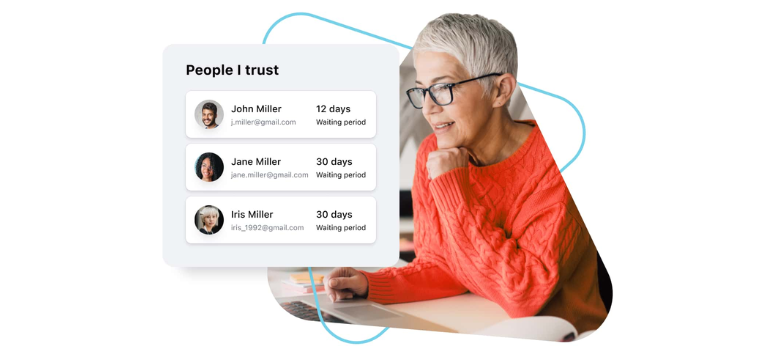
Life doesn’t always give you time to prepare. When something unexpected happens, access to important accounts and information can quickly become a problem for the people around you. LastPass Emergency Access provides a simple way to grant access to someone you trust, without giving up control in advance.
It works like a digital safety net that stays in place until it’s needed:
-
Trusted contacts - Assign one or more people who can request access to your vault
-
Private by default - Your data stays fully protected unless access is approved or the wait time passes
-
Timed access control - Set a delay window before access is granted
It supports real situations where access matters most:
-
Medical emergencies - Share health records or important details stored in secure notes
-
Family support - Help loved ones manage accounts, bills, or essential services
-
Long-term planning - Provide access to documents like insurance details or digital records
The process stays structured and secure:
-
Invite a contact - Add a trusted user from within your vault
-
Set permissions - Define how long access requests should wait
-
Approve or allow - Grant access manually or let it proceed after the set time
Even in urgent moments, control remains with you. Access is never instant unless you allow it, and every request gives you a chance to respond. Set up Emergency Access in LastPass and make sure the people you trust aren’t locked out when it matters most.
Secure Notes - Keep Sensitive Details Where They Actually Belong 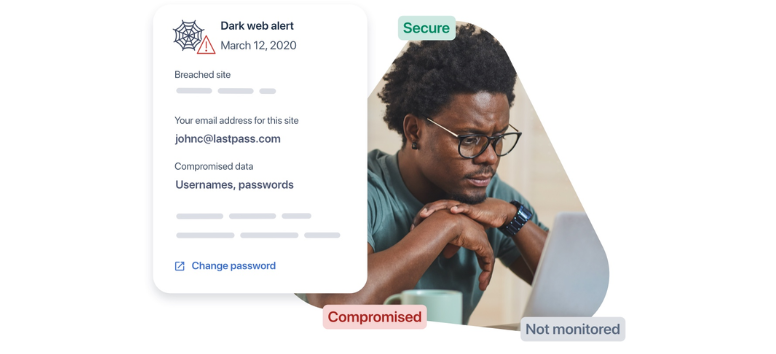
A lot of important information ends up in places that feel convenient but aren’t built for protection. Notes apps, emails, and even cloud storage often hold details that were never meant to sit exposed. LastPass Secure Notes gives those details a safer place, right inside your encrypted vault.
Instead of scattering sensitive data across apps, everything stays organized and protected:
-
Private records - Store IDs, insurance details, and important documents
-
Financial information - Keep credit cards, banking details, and billing info secured
-
Login support - Save security questions or backup credentials
It replaces habits that quietly create risk over time:
-
No unsecured notes - Avoid storing sensitive data in apps without encryption
-
No exposed details - Keep information out of emails or shared drives
-
No scattered storage - Bring everything into one controlled space
Security works quietly in the background without adding friction:
-
Device-level encryption - Your data is encrypted before it even leaves your device
-
Zero-knowledge model - Only you can access and decrypt your information
-
Strong protection standards - Encryption methods trusted by banks and institutions
Once saved, your notes stay accessible whenever you need them, without sacrificing privacy for convenience. Start using LastPass Secure Notes and keep your sensitive information stored where it actually stays protected.
Digital Will - Organize What Matters for the People You Trust 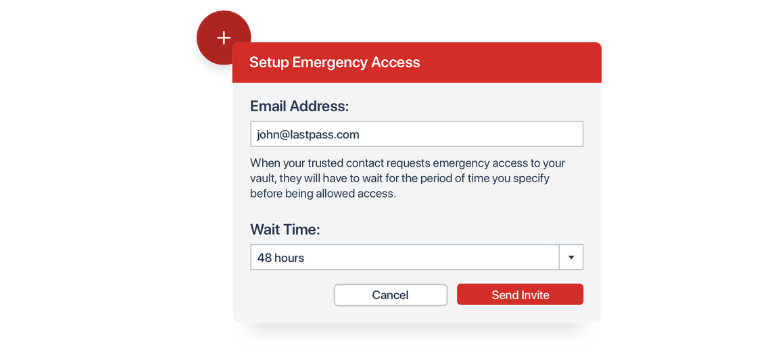
Your digital life keeps growing over time. Accounts, subscriptions, documents, and private details all sit across different platforms. When something unexpected happens, accessing those details can become difficult for the people who need them most. A digital will in LastPass helps you keep everything organized and ready, without leaving things unclear.
It brings structure to information that often gets overlooked:
-
Account access - Store passwords and PINs for devices, banking, and online accounts
-
Important records - Keep legal documents, insurance details, and personal files
-
Digital assets - Include subscriptions, payment methods, and even cryptocurrency access
Setting it up stays simple and controlled:
-
Create a dedicated folder - Organize your digital will inside your vault
-
Add key details - Save passwords, notes, and documents in one place
-
Share through Emergency Access - Assign trusted contacts who can request access when needed
It also supports long-term planning across families:
-
For yourself or loved ones - Help manage digital records for parents or relatives
-
Clear access process - Set a waiting period before access is granted
-
Reliable handover - Keep essential information available without confusion
Instead of leaving accounts scattered or locked away, everything stays structured and accessible when it matters most. Set up a digital will in LastPass to keep your digital life organized for the people who rely on it.
Passwordless Vault Login - Access Without Typing a Thing-https://www.lastpass.com/features/passwordless-authentication https://lastpass.wo8g.net/NGN9kO
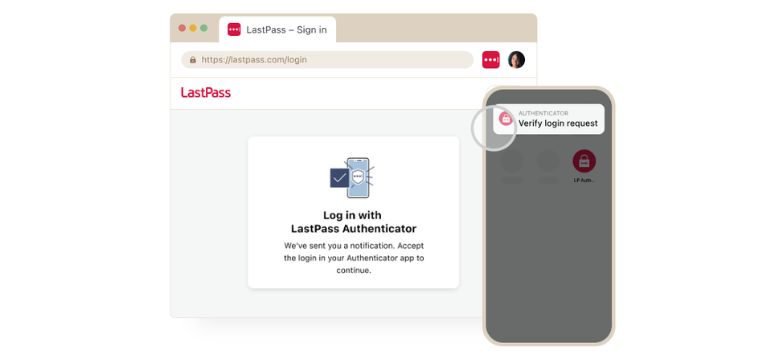
Typing a master password every time can slow things down, especially when you’re switching between devices or logging in throughout the day. LastPass passwordless vault login removes that extra step and lets you access your vault using methods that feel faster and more natural.
Once set up, access becomes simpler without losing control:
-
One-time verification - Confirm your device once, then move forward without repeated logins
-
Biometric access - Use fingerprint or face recognition on supported devices
-
Flexible options - Choose from authenticator apps, hardware keys, or built-in device security
It also reduces the usual friction that comes with passwords:
-
Fewer resets - No need to recover or retype your master password constantly
-
Faster access - Open your vault and get what you need without delay
-
Smoother workflow - Stay focused without login interruptions
Security stays layered even without manual entry:
-
Trusted devices - Access is tied to devices you’ve verified
-
Strong authentication - Use biometrics or FIDO2-certified methods
-
Added protection - Combine multiple factors without extra effort
Across devices, the experience stays consistent:
-
Desktop access - Log in through push notifications or hardware keys
-
Mobile access - Use fingerprint or face ID for quick entry
-
Unified control - Manage everything from your vault settings
It turns login into something you barely notice, while still keeping your data protected. Enable passwordless login in LastPass and access your vault with less effort and more control.
User Management - Full Control Over Access, Policies, and Security-https://www.lastpass.com/features/user-management 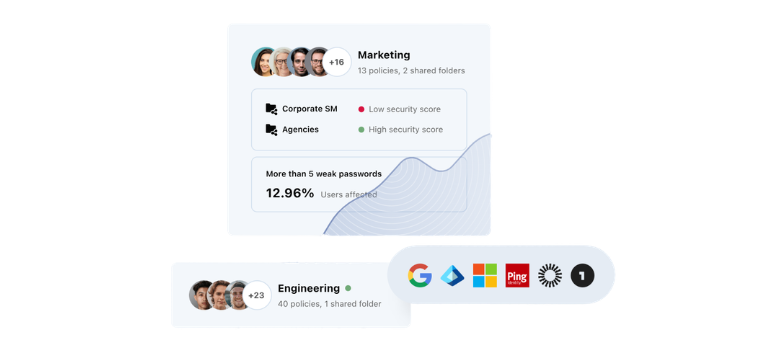
Managing users across a growing team can get complicated fast. Accounts multiply, access changes, and security gaps start to appear. LastPass user management brings everything into one platform, giving you clear oversight without juggling multiple tools.
At the center is a dashboard that keeps everything visible and adjustable:
-
Centralized control - Manage users, policies, and access from one place
-
Group organization - Assign permissions based on roles or teams
-
Flexible admin roles - Give the right level of control to each administrator
Security settings stay detailed without becoming overwhelming:
-
Granular policies - Set rules for passwords, authentication, and device access
-
Multifactor authentication - Add stronger protection across accounts and endpoints
-
Access restrictions - Limit logins by device, location, or behavior
As your team grows, the system adapts without slowing you down:
-
Automated provisioning - Add or remove users without manual setup
-
Scalable structure - Use groups and templates to roll out access quickly
-
Seamless onboarding - Sync users through directory integrations
Visibility plays a key role in keeping everything aligned:
-
Real-time monitoring - Track password health and account activity
-
Audit trails - Review actions and changes across the organization
-
App oversight - Identify and manage unsanctioned tools in use
It also connects with the systems businesses already rely on:
-
Directory integration - Sync with identity providers for user management
-
Single sign-on - Simplify access to business apps without extra passwords
-
Advanced reporting - Export data for compliance and internal tracking
Instead of managing access in fragments, everything stays connected and easy to control from one place. Start managing users with LastPass and keep your organization’s security aligned as it grows.
SaaS Protect - Take Control of Apps Without Slowing Your Team Down
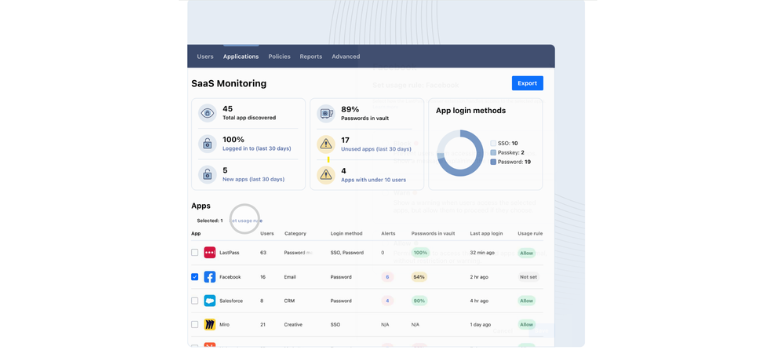
SaaS tools pile up fast across teams. New apps get added, old ones stick around, and visibility starts to fade. That’s where SaaS Protect comes in. It gives you a clear way to manage access, reduce risk, and keep your software environment from getting out of hand.
At the core, it helps you control how apps are used across your organization:
-
App access control - Allow, restrict, or block tools based on your policies
-
Shadow IT visibility - Spot unsanctioned or risky apps before they create issues
-
Real-time enforcement - Apply rules without disrupting how teams work
It also strengthens how credentials are handled across those tools:
-
Weak password detection - Identify reused, expired, or compromised credentials
-
Guided updates - Prompt users to improve password practices
-
Reduced account risk - Lower exposure to takeovers and data leaks
Beyond security, it helps clean up your overall SaaS environment:
-
Usage insights - Identify unused or redundant applications
-
Cost awareness - Reduce spending tied to unnecessary tools
-
Simplified operations - Manage fewer apps with clearer structure
Visibility stays consistent for teams that need accountability:
-
Audit-ready reports - Track usage, access, and policy enforcement
-
Activity monitoring - Keep a clear record of user behavior
-
Compliance support - Stay aligned with internal and external requirements
Everything runs from the same LastPass dashboard, so there’s no need to switch systems or retrain teams. Start using SaaS Protect in LastPass and bring order to your apps without adding extra complexity.
Directory Integration - Connect Your Systems and Automate User Access
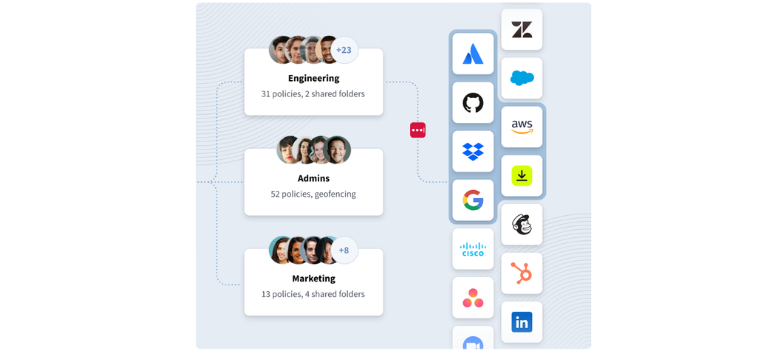
Managing users manually across systems takes time and leaves room for errors. Directory integration in LastPass connects your existing identity provider, so user access stays aligned without constant updates. Your directory becomes the source of truth, handling authentication and access behind the scenes.
Once connected, user management becomes more streamlined:
-
Automated provisioning - Add new users without manual setup
-
Instant deprovisioning - Remove access as soon as roles change
-
Group syncing - Keep permissions aligned with team structures
It simplifies how access is verified and controlled:
-
Central authentication - Validate users through your identity provider
-
Consistent access rules - Apply the same policies across systems
-
Reduced admin workload - Manage everything from one connected source
It also works with the platforms businesses already use:
-
Microsoft Active Directory - Sync on-premise user profiles
-
Microsoft Entra ID - Manage cloud-based directories
-
Google Workspace - Automate user and group management
-
Okta, OneLogin, Ping - Integrate with existing SSO providers
-
Custom API - Support more complex enterprise setups
Instead of managing users in separate systems, everything stays connected and updates automatically as your organization evolves. Set up directory integration in LastPass and keep user access aligned without the manual work.
Federated Login - One Set of Credentials, Seamless Access Everywhere-https://www.lastpass.com/features/federated-login 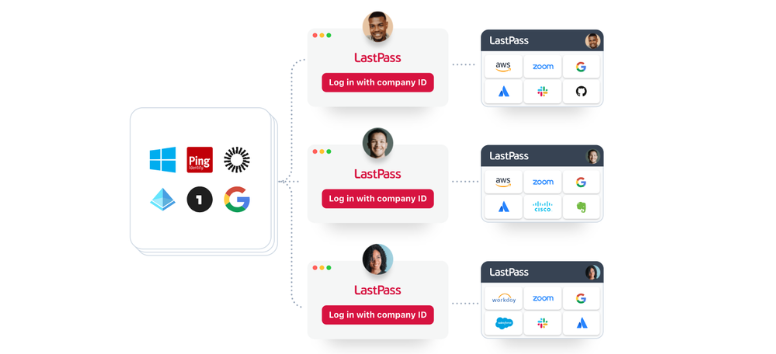
Logging into multiple systems can slow teams down, especially when each tool requires its own credentials. Federated login in LastPass simplifies that experience by letting users access their vault using the same credentials tied to your organization’s identity provider.
Once connected, access becomes more direct and consistent:
-
Single credential access - Log in using existing directory credentials
-
Faster entry - Reduce repeated logins across tools and systems
-
Familiar workflow - Keep access tied to systems your team already uses
It also reduces the usual friction tied to password management:
-
No extra passwords - Remove the need for separate master password entry
-
Less login fatigue - Keep access simple without adding steps
-
Smoother onboarding - New users can get started without setup delays
For IT teams, it helps keep identity management aligned:
-
Automated onboarding - Sync user access through your directory
-
Simplified offboarding - Remove access as roles change
-
Stronger adoption - Easier access leads to faster team usage
Security stays layered without becoming visible to users:
-
Zero-knowledge architecture - Data stays encrypted at the device level
-
Split key protection - Access relies on multiple secure components
-
Strong encryption standards - Built with trusted security protocols
It integrates with the identity systems many organizations already rely on:
-
Microsoft Active Directory and Entra ID
-
Google Workspace
-
Okta, Ping, and OneLogin
Instead of juggling credentials across platforms, access stays connected through a single, trusted identity. Enable federated login in LastPass and simplify how your team accesses the tools they use every day.
Workstation MFA - Secure Every Device Without Slowing Your Team 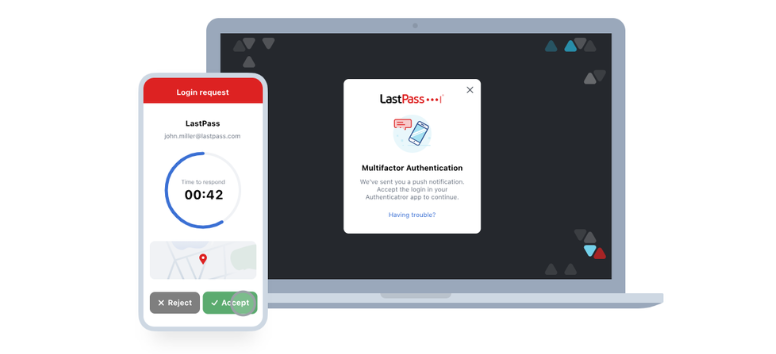
Work devices are often the first point of access into company systems. Once a workstation is compromised, everything connected to it becomes vulnerable. Workstation MFA in LastPass adds a stronger layer of protection by requiring an additional authentication step before access is granted.
It strengthens login security without making the process harder for users:
-
Biometric authentication - Use fingerprint or device-based verification instead of relying on passwords alone
-
Consistent access experience - Keep logins uniform across devices and locations
-
Secure remote access - Protect sessions, including remote desktop connections
For admins, deployment stays straightforward and scalable:
-
Central rollout - Deploy across endpoints using existing tools and installers
-
No user setup required - Apply security measures without disrupting employees
-
Flexible configuration - Adjust settings based on company needs
It also gives organizations control over how authentication is handled:
-
Secondary verification - Add MFA on top of existing workstation passwords
-
Passwordless option - Replace passwords entirely with secure authentication methods
-
Policy-driven access - Enforce security requirements across all devices
Instead of relying on passwords alone, workstation access becomes layered, consistent, and easier to manage at scale. Enable Workstation MFA in LastPass and secure every login point across your organization’s devices.
Browser and Mobile Autofill - Consistent Access Across Every Device
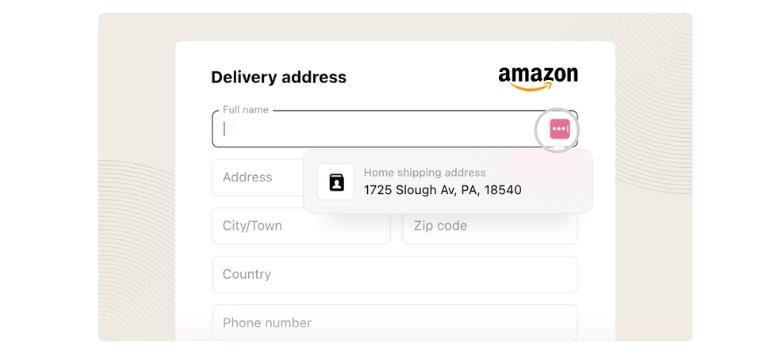
Autofill works best when it feels the same everywhere. LastPass extends that experience across browsers and mobile devices, so logging in stays consistent no matter where you are. Instead of adjusting to different systems, your credentials follow a single, secure workflow.
It supports how people move between devices throughout the day:
-
Cross-platform coverage - Works across Chrome, Safari, Firefox, Edge, Android, and iOS
-
Offline access - Fill in credentials even without an internet connection
-
Unified experience - Keep login behavior consistent across apps and sites
Security stays built into every action without becoming visible:
-
Encrypted autofill - Credentials are protected before they sync across devices
-
Biometric unlock - Use fingerprint or face recognition on mobile for quick access
-
Protected sessions - Keep autofill limited to trusted environments
It also extends beyond basic login fields:
-
Form completion - Fill payment details, addresses, and personal data instantly
-
Secure note access - Pull stored information when needed without switching apps
-
Faster transactions - Move through checkouts and registrations with less delay
For businesses, control stays intact even with automation:
-
Policy-based autofill - Restrict or allow autofill based on company settings
-
Usage visibility - Track how credentials are used across systems
-
Controlled environments - Keep autofill aligned with security policies
Instead of adjusting to different tools, autofill becomes one consistent system that works wherever you log in. Use LastPass autofill across your devices and keep access smooth without losing control.
LastPass Plans in 2026 - Options That Match How You Work and Share
Free Plan - A Simple Start Without Commitment
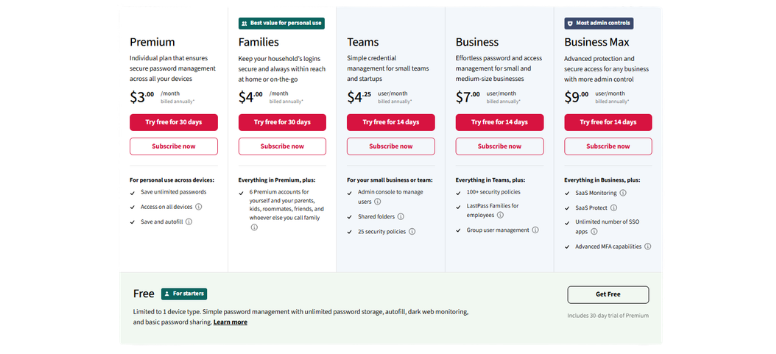
The LastPass Free plan gives you a clean way to begin managing passwords without adding cost. It allows you to store unlimited passwords and use autofill, which already removes a lot of daily friction. The limitation comes in device type access, where you choose between mobile or desktop, keeping usage focused on one environment.
LastPass Free still delivers a structured introduction to password management. It helps you organize logins, reduce reuse habits, and experience how automated access works. It’s a practical entry point for users who want to test how LastPass fits into their routine before expanding further.
Start with LastPass Free and get a feel for managing your passwords in one place.
Premium Plan - Full Access Across Your Digital Routine
LastPass Premium builds on the basics by removing device limits and expanding your control across platforms. With LastPass Premium, your passwords sync across all devices, while features like the security dashboard, emergency access, and passwordless login bring more visibility and flexibility into your setup.
LastPass Premium suits users who rely on multiple devices throughout the day and want consistent access without switching systems. It also adds tools that help you monitor and improve your password habits over time, keeping everything aligned as your digital footprint grows.
Upgrade to LastPass Premium and keep your access consistent wherever you log in.
Families Plan - Shared Access Without the Usual Confusion
The LastPass Families plan brings structure to shared accounts across households. With LastPass Families, up to six users get Premium-level access, along with tools designed for safe and organized sharing between family members or roommates.
LastPass Families makes it easier to manage shared logins like streaming services, utilities, or subscriptions without passing passwords around. Each member keeps their own vault, while shared access stays controlled and easy to update. It works well for households that want to stay organized without mixing personal and shared data.
Set up LastPass Families and keep shared access clear and easy to manage.
Teams Plan - A Practical Setup for Growing Workflows
The LastPass Teams plan focuses on small groups that need structure without heavy complexity. With LastPass Teams, businesses get access to an admin console, shared folders, and centralized credential management designed for everyday collaboration.
LastPass Teams helps reduce the risks that come from informal password sharing across teams. It introduces a controlled way to manage access while keeping workflows simple. For startups or small teams, it creates a stable foundation without requiring a full enterprise setup.
Use LastPass Teams to bring order to how your team handles shared access.
Business Plan - Centralized Control for Expanding Organizations
The LastPass Business plan expands control across larger teams with more advanced tools. With LastPass Business, organizations gain access to features like directory integration, federated login, and SaaS Protect, all managed through a centralized admin system.
LastPass Business supports teams that need visibility, automation, and stronger policy enforcement as they scale. It allows IT to manage users, monitor activity, and maintain consistent access across systems without relying on manual processes.
Move to LastPass Business and manage access across your organization with more clarity.
Business Max Plan - Advanced Protection for High-Scale Operations
The LastPass Business Max plan brings the most complete set of tools for organizations with higher security demands. With LastPass Business Max, features like Workstation MFA and advanced compliance tools add deeper control across devices and systems.
LastPass Business Max fits environments where security policies, audits, and endpoint protection play a larger role in daily operations. It strengthens how access is managed while keeping workflows consistent across teams and devices.
Adopt LastPass Business Max and extend your security across every level of your organization.
Digital access continues to expand across devices, accounts, and teams. LastPass brings clarity to that growth by keeping everything organized in one place. It supports daily logins, shared access, and long-term security without adding extra steps. Instead of scattered tools and repeated logins, it creates a system that stays consistent. As online activity increases, managing access becomes part of everyday routine. Check how LastPass fits into your setup and simplify how you handle your accounts.