The Ultimate Squarespace Spring Clean: A Technical Audit Checklist for Better Speed and SEO
 By Noah Roni
 Software
Website performance and SEO quietly shape growth long before conversions happen. Slow load times, outdated pages, and overlooked technical issues can hold a site back, even when the content looks solid. A “spring clean” reframes optimization as a proactive audit, a chance to refresh structure, improve speed, and tighten SEO before problems surface. With Squarespace, site owners have access to built-in tools and flexible settings that make technical improvements approachable, manageable, and worth revisiting regularly.
Fix the Invisible: Why a Technical Audit Makes or Breaks Growth

User Experience
User experience starts with performance. When pages load quickly, visitors stay longer, explore more, and interact with confidence. Even small delays can interrupt momentum and push users away before they engage. A technical audit helps uncover slow-loading pages, broken links, and layout issues that quietly damage engagement.
-
Speed directly impacts engagement by reducing bounce rates
-
Conversions improve with faster sites and smoother interactions
-
Smooth navigation builds trust through responsive, error-free pages
Improving these elements doesn’t require rebuilding your site from scratch. With Squarespace, many performance fixes can be handled directly inside the platform.
Search Rankings
Search visibility depends on technical health. Google rewards sites that load fast, work well on mobile, and follow technical best practices. A technical audit ensures your site meets these expectations instead of falling behind competitors.
-
Google prioritizes speed as a confirmed ranking factor
-
Mobile optimization is critical under mobile-first indexing
-
Technical SEO matters for crawlability, security, and structure
By reviewing these areas regularly, you protect your rankings and discover new optimization opportunities. Squarespace’s built-in SEO and performance tools make ongoing improvements easier to manage.
Brand Credibility

A site reflects how serious a brand feels. When pages break, load slowly, or display errors, trust drops fast. A technical audit helps maintain a polished experience that reinforces credibility at every touchpoint.
-
Polished sites signal professionalism and reliability
-
Error-free experiences reduce skepticism during key actions
-
Consistency reinforces brand identity across devices and pages
Keeping everything running smoothly supports confidence before a visitor ever contacts you. Squarespace helps maintain that consistency with stable hosting and reliable site infrastructure.
Squarespace Advantage
Running a technical audit feels less overwhelming when tools live in one place. An all-in-one platform reduces complexity and removes the need for multiple integrations.
-
All-in-one platform for design, hosting, and commerce
-
Built-in security with SSL included by default
-
SEO tools integrated for visibility and structure
-
Performance optimization through responsive, fast-loading templates
If you want technical improvements without heavy maintenance, Squarespace offers a practical foundation for ongoing site health.
Load Faster, Rank Better: Your Website Speed Optimization Checklist
Image Audit

Images play a major role in website speed and SEO. Oversized or poorly formatted images slow load times and increase bounce rates. A proper image audit focuses on compression, correct file types, and sizing that matches your template’s layout. When images load faster, pages feel smoother, and search engines reward that performance.
-
Squarespace’s built-in image editor compresses and resizes automatically
-
Large, unoptimized images are the #1 cause of slow load times
-
Best practice: Use JPG for photos, PNG for transparent graphics, and correct dimensions
To improve page speed without sacrificing quality, manage image optimization directly inside Squarespace.
Video & Media

Video content boosts engagement, but it can also hurt performance if handled poorly. Heavy media files increase load time, especially on mobile devices. A speed-focused audit reviews how videos are embedded and delivered to visitors.
-
Squarespace video blocks support YouTube, Vimeo, or direct uploads
-
Avoid autoplay to reduce initial load and mobile data use
-
Optimize file size by hosting large videos externally
Balancing rich media with fast performance is easier when you structure and embed content thoughtfully using Squarespace.
Code Injection Review
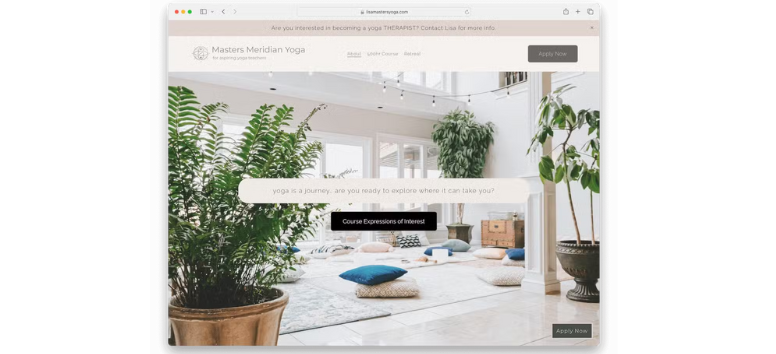
Custom code adds flexibility, but it can quietly slow your site. Excess scripts increase render time and may conflict with optimized templates. A regular review helps remove unnecessary weight and protect performance.
-
Custom code can slow performance when overused
-
Remove unused or outdated code, like old tracking scripts
-
Minimal injection recommended for faster load times
If speed matters more than heavy customization, keep code clean and controlled inside Squarespace’s optimized framework.
Third-Party Integrations
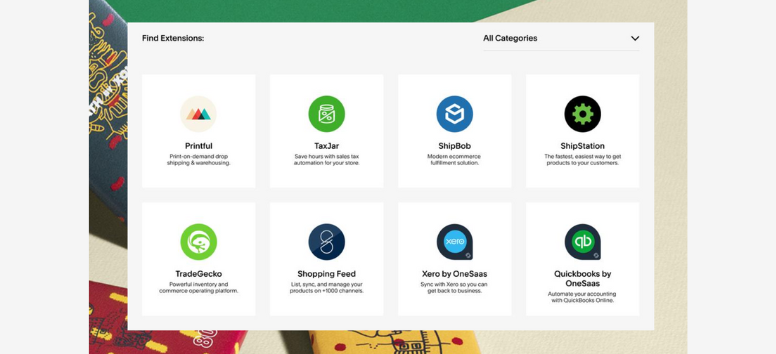
External tools affect performance more than most site owners realize. Each added script increases load requests, which can delay page rendering and impact SEO. Auditing integrations keeps only what truly adds value.
-
Plugins and scripts affect load times significantly
-
Audit integrations regularly to remove unused tools
-
Prioritize lightweight solutions optimized for mobile
Streamlining integrations helps pages load faster and keeps the user experience smooth when managed within Squarespace.
Mobile Responsiveness

Mobile speed is critical for SEO and engagement. Since most traffic comes from phones, pages must load fast and display cleanly across devices. A mobile-focused audit checks responsiveness, spacing, and performance.
-
Squarespace templates are responsive by default
-
Test across devices using mobile preview and real phones
-
Mobile speed matters for rankings and retention
To maintain fast, mobile-friendly pages that meet search engine standards, rely on Squarespace’s responsive design system.
Fix Before You Rank: A Step-by-Step SEO Audit That Actually Matters
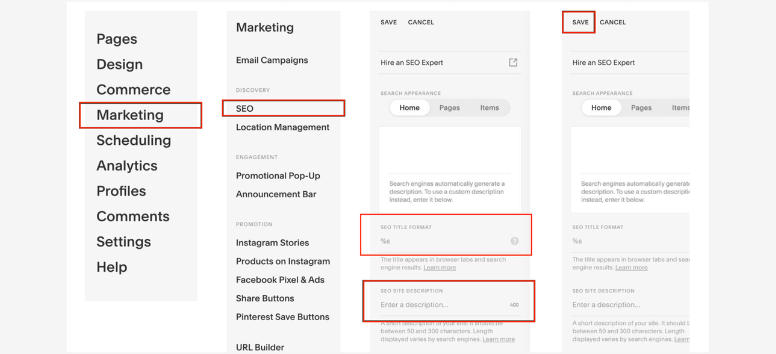
Page Titles & Meta Descriptions
Metadata shapes first impressions in search results. Page titles and meta descriptions help search engines understand relevance while encouraging users to click. When these elements are clear and keyword-focused, visibility and click-through rates improve together. A proper audit reviews length, clarity, and intent across all key pages.
-
Squarespace SEO panel allows easy customization per page
-
Optimized metadata improves click-through rates and relevance
-
Best practice: Titles under 60 characters and descriptions under 160
Refining metadata doesn’t require plugins or manual code when you manage it directly inside Squarespace.
URL Structure
URLs quietly influence both trust and rankings. Clean, descriptive paths help users understand where they are while signaling relevance to search engines. An SEO audit checks for clarity, length, and keyword alignment.
-
Clean, keyword-friendly URLs are easier to crawl and trust
-
Squarespace automatically generates URLs, with full editing control
-
Avoid unnecessary parameters for better readability and rankings
Maintaining organized URL structures is simpler when everything is centralized within Squarespace.
Heading Hierarchy

Headings guide both readers and search engines. A clear structure improves readability while reinforcing topic relevance. Auditing headings ensures pages communicate hierarchy correctly.
-
Proper use of H1, H2, H3 tags signals structure
-
One H1 per page keeps focus clear
-
Improves readability and SEO through a scannable layout
Building a clean content hierarchy is easy when pages are structured intentionally in Squarespace.
Alt Text for Images
Alt text supports accessibility and search visibility at the same time. An audit checks whether images accurately describe content and support keyword context without stuffing.
-
Alt text improves accessibility for screen readers
-
SEO benefit through image indexing
-
Squarespace image editor includes dedicated alt text fields
Optimizing images for search and accessibility stays simple when managed directly in Squarespace.
Internal Linking
Internal links strengthen site structure and guide visitors deeper into content. A strong linking strategy improves crawlability and keeps users engaged longer.
-
Strengthens site architecture and authority flow
-
Squarespace’s link tools make internal linking simple
-
Best practice: Use descriptive anchor text
Building meaningful connections between pages is easier when links are managed natively in Squarespace.
Blog Optimization
Fresh content signals relevance. An SEO audit reviews blog updates, keyword placement, and overall structure to keep posts competitive.
-
Update old posts to signal activity
-
Add keywords strategically for relevance
-
Content freshness matters for rankings
Keeping blog content current and optimized is straightforward with Squarespace’s built-in blogging tools.
Under the Hood: Squarespace Tools That Power Speed, SEO, and Stability
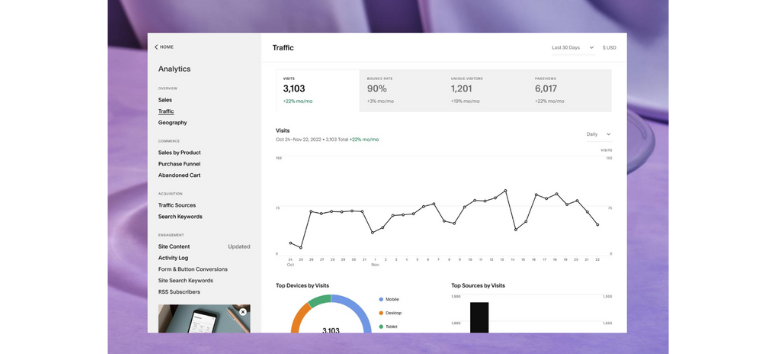
Squarespace Analytics
Understanding performance starts with clear data. Squarespace Analytics offers a built-in dashboard that tracks traffic sources, visitor behavior, conversions, and sales without extra tools. This visibility helps identify what drives engagement and where drop-offs happen, so optimization stays focused and practical.
-
Built-in dashboard with no third-party setup
-
Key metrics tracked include traffic, conversions, and content performance
-
Conversion insights like abandoned carts and order values
Use these insights to refine content, marketing, and site structure directly inside Squarespace.
SEO Settings Panel
SEO works best when it’s centralized. Squarespace’s SEO settings panel lets you control site-wide defaults while fine-tuning individual pages. This balance supports consistent optimization and targeted keyword strategies across your site.
-
Site-wide defaults for metadata and visibility
-
Customizable per page for focused keyword targeting
-
Automatic sitemaps for efficient indexing
Managing SEO settings in one place keeps optimization efficient and scalable with Squarespace.
Built-In CDN (Content Delivery Network)
Speed and reliability affect rankings and user experience. A built-in CDN delivers assets from servers closest to visitors, reducing load times and improving global performance. This infrastructure supports consistent access even during traffic spikes.
-
Global performance boost through distributed servers
-
Faster load times with reduced latency
-
Reliability via traffic balancing
For faster pages worldwide without extra configuration, rely on Squarespace’s CDN infrastructure.
SSL Certificates
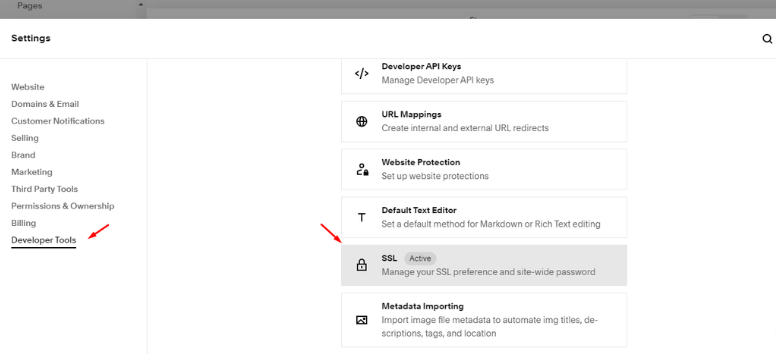
Security supports trust and SEO. Every Squarespace site includes SSL by default, encrypting data and protecting user information. This also signals credibility to visitors and search engines alike.
-
Automatically included SSL certificates
-
Security benefits through encrypted connections
-
Trust signals like HTTPS and the padlock icon
Keeping your site secure and search-ready is simple when SSL is automatically handled by Squarespace.
Structured Data Support
Structured data helps search engines understand content context. Squarespace includes a built-in schema for products, events, and more, improving eligibility for rich search results without manual coding.
-
Schema markup is built in for key content types
-
SEO advantage through enhanced search listings
-
No coding required for implementation
Enhance search visibility and presentation effortlessly by using Squarespace’s structured data support.
Set It and Sustain It: Ongoing Website Maintenance That Works
Quarterly Audits
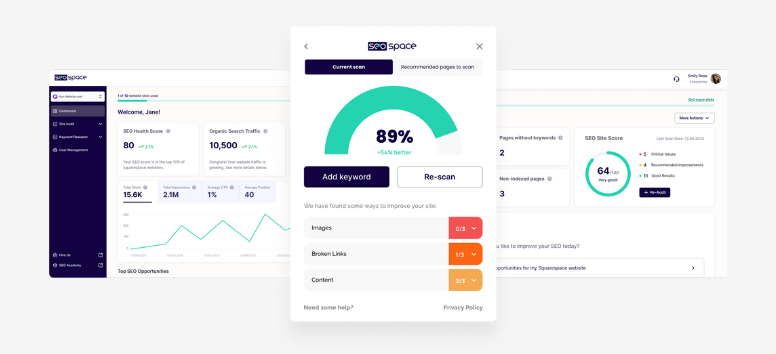
Quarterly audits keep small issues from becoming big problems. Regular reviews help spot speed slowdowns, SEO gaps, and outdated integrations before they affect traffic or rankings. Treat audits as routine upkeep, not emergency fixes.
-
Regular reviews prevent issues by catching problems early
-
Speed checks matter to maintain fast load times
-
SEO audits keep rankings strong through consistent optimization
Staying on top of audits feels more manageable when performance and SEO tools are already built into Squarespace.
Content Updates
Content should evolve as your business does. Updating pages signals relevance to search engines and reassures visitors that information is current. Even small refreshes can improve visibility and engagement.
-
Fresh content boosts SEO and signals activity
-
Product and service pages need consistency to stay accurate
-
Customer engagement improves with new or updated material
Managing edits, updates, and republishing stays simple when content lives inside Squarespace.
Broken Link Check
Broken links interrupt user journeys and weaken trust. Regular checks help maintain smooth navigation and protect SEO performance. Fixing links quickly keeps pages feeling polished and reliable.
-
Squarespace link management tools flag broken links automatically
-
Broken links hurt credibility and frustrate users
-
Best practice is to review links quarterly or after updates
Maintaining clean, functional navigation is easier when link issues are surfaced directly in Squarespace.
Performance Monitoring
Monitoring performance turns maintenance into strategy. Analytics reveal what’s working, what’s slowing users down, and where improvements matter most. Consistent tracking helps your site adapt over time.
-
Squarespace Analytics tracks traffic, engagement, and conversions
-
Google Search Console complements insights on search visibility
-
Data-driven improvements keep growth aligned with behavior
When performance data is easy to access, smarter decisions follow inside Squarespace.
A technical audit keeps your Squarespace site fast, optimized, and easy for search engines to understand. It helps uncover small issues before they affect rankings, user experience, or conversions. With Squarespace, many technical tasks are already built into the system, from performance optimization to SEO and security, which makes ongoing maintenance far more manageable. Now is a good time to run your own website spring clean, refine what needs attention, and commit to regular optimization that supports long-term growth.