Squarespace Core Makes Website Creation Easier Than Ever
 By Noah Roni
 Services
A modern business website needs more than a clean homepage. Product pages, mobile optimization, SEO settings, branding, and content management all play a role in creating a site that actually works after launch. Squarespace simplifies that process through an all-in-one platform designed to keep website creation organized from the beginning.
For new businesses, the Squarespace Core plan offers a strong balance between cost and functionality. It includes practical features like 0% transaction fees on physical products, unlimited contributors, built-in hosting, and advanced design customization tools. It helps users move from template selection to publishing without getting stuck in technical details or juggling multiple platforms along the way.
Launch Faster Without the Usual Website Setup Mess
Easy Sign-Up & Dashboard: One Place to Run Your Website

Squarespace Core keeps the setup process straightforward from the beginning. Users can create an account in minutes, then access a dashboard that centralizes website management tools in one place. Instead of switching between separate platforms for analytics, ecommerce, design, and content updates, users can manage everything from a single workspace.
The dashboard helps users quickly handle:
-
Website pages and navigation
-
Product listings and orders
-
Site traffic and analytics
-
Design customization settings
-
Marketing and SEO tools
The layout works well for non-technical users because it keeps tools visible and easy to manage. Start with the dashboard first, then expand your website as your business grows.
Explore the Squarespace Core dashboard and simplify website management from the start.
Choosing a Mobile-Optimized Template: Design That Already Works Everywhere

Squarespace designs every template to adapt automatically across phones, tablets, and desktops. Users do not need to build separate mobile versions or spend extra time adjusting layouts for different screen sizes. That setup helps businesses launch websites faster while maintaining a polished appearance across devices.
Squarespace also groups templates by business category, which makes the selection process easier for first-time users.
Popular template categories include:
-
Online stores
-
Restaurants and cafes
-
Creative portfolios
-
Service businesses
-
Blogs and media brands
The Core plan also supports CSS and JavaScript customization for users who want more control over layouts and styling. Choose a template that already matches your business structure to reduce editing time later.
Browse Squarespace templates that align with your brand and simplify the design process.
Setting Up Your Domain: Keep Everything Connected

Squarespace Core allows users to purchase, connect to, or transfer domains directly on the platform. It removes the extra steps that often come with third-party domain providers and keeps website management more organized from the start.
Squarespace also automatically activates SSL certificates, helping secure the website immediately after setup. Users can focus on building pages, adding products, and publishing content instead of configuring separate security tools.
Squarespace domain setup includes:
-
Direct domain registration
-
Existing domain transfers
-
Automatic SSL security
-
Centralized billing and management
-
Faster website connection setup
Keeping the domain, hosting, and website tools together reduces setup delays and creates a smoother launch process for new businesses.
Connect your domain to Squarespace Core and manage your website from a single streamlined platform.
Design Pages Without the Technical Slowdown
Drag-and-Drop Editor: Build Pages Without the Technical Friction

Squarespace Core gives users a design system that feels easy to control, even during the first website setup. The drag-and-drop editor allows users to move text, images, galleries, buttons, and content sections directly on the page without coding. Instead of working within a complex backend, users can adjust layouts visually and see changes in real time.
The editor also includes controls for:
-
Section backgrounds and spacing
-
Text formatting and image ratios
-
Content alignment and layout flow
-
Buttons, links, and page sections
-
Mobile-friendly visual adjustments
These tools help users create polished layouts faster while keeping the editing experience manageable for beginners. Start with simple layout adjustments first, then refine sections as your website grows.
Build cleaner, more professional website pages with the Squarespace editor while keeping your workflow efficient.
Custom Code Injection: More Control Beyond Templates
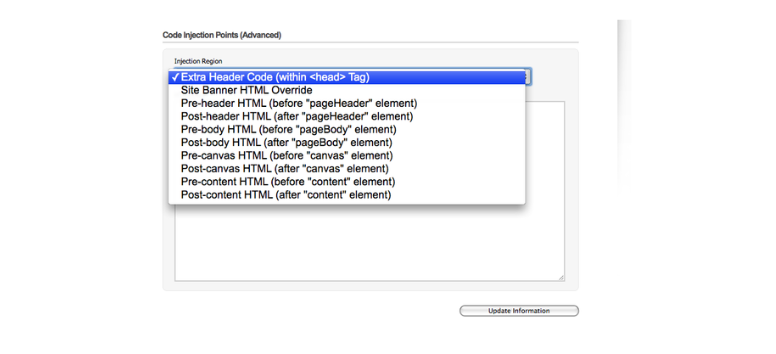
Squarespace Core includes Custom CSS and JavaScript injection, which gives advanced users more flexibility beyond standard template controls. Businesses can fine-tune typography, spacing, animations, layouts, and interactive elements without rebuilding the entire website structure from scratch.
This feature also supports third-party scripts and integrations that help expand website functionality over time.
Users can add:
-
Tracking pixels and analytics scripts
-
Chat widgets and support tools
-
Custom animations and styling
-
Third-party integrations
-
Advanced layout adjustments
The added customization layer works especially well for brands that want a more distinct website appearance while still using Squarespace’s built-in framework. Businesses can start with a template, then gradually customize the experience as their needs evolve.
Add custom styling and integrations through Squarespace Core to create a website that feels more tailored to your brand.
Branding Tools: Keep Your Website Consistent Across Every Page

Strong branding depends on consistency, especially across navigation, typography, colors, and layouts. Squarespace Core helps users manage those elements through the Site Styles panel, which centralizes design settings across the website.
Users can update:
-
Global fonts and typography
-
Brand color palettes
-
Button styles and layouts
-
Section spacing and padding
-
Full-width backgrounds and alignment
Squarespace also includes built-in logo tools and integrations that help businesses create a more unified visual identity. Instead of manually editing each page one by one, users can apply branding changes sitewide through centralized controls. That setup keeps websites looking cleaner and more professional as content expands over time.
Create a more visually consistent website from homepage to checkout page with Squarespace branding tools.
Build Content That Keeps Your Website Active
Adding Pages: Build the Core Sections Your Website Needs
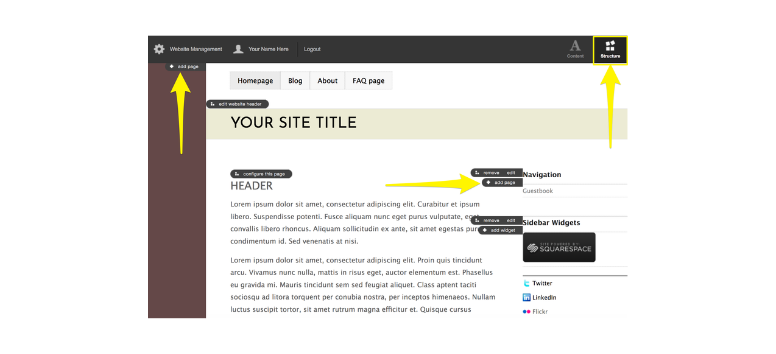
Squarespace Core helps businesses build website pages quickly without starting from a blank layout. Users can create About, Services, Contact, and Blog pages directly from the dashboard using pre-built page structures that already follow clean website layouts. That setup speeds up the content creation process while keeping pages organized and visually consistent.
The platform also supports:
-
Blog categories and tags
-
Scheduled blog publishing
-
Custom text and image sections
-
Contact forms and integrations
-
Embedded forms connected to email tools
Businesses can update content, publish announcements, and expand website pages without relying on separate plugins or complicated editors. Build the essential pages first, then continue adding content as your website grows.
Create organized website pages through Squarespace Core and keep content management simple from the start.
Video Hosting: Keep Multimedia Content Inside Your Website

Video content now plays a major role in product marketing, tutorials, service explainers, and brand storytelling. Squarespace Core includes 5 hours of video storage with Squarespace Video Studio, giving businesses more room to upload branded video content directly to their website.
The platform supports:
-
Product demonstrations
-
Tutorials and walkthroughs
-
Promotional brand videos
-
Embedded multimedia sections
-
Secure cross-device streaming
Unlike lower-tier plans with limited storage, Core gives businesses more flexibility to expand multimedia content without depending entirely on external video platforms. Videos also maintain a cleaner, more branded experience because users stay on the website instead of navigating elsewhere to watch content.
Upload branded video content through Squarespace Core and create a more engaging website experience across every page.
SEO Tools: Build Pages That Search Engines Can Understand

A professional website still needs strong search visibility after launch. Squarespace Core includes built-in SEO tools that help businesses organize pages for better indexing and cleaner search presentation without installing additional plugins.
The platform automatically supports:
-
Clean and readable URLs
-
Editable meta titles and descriptions
-
Automatic XML sitemap generation
-
SSL certificates for secure browsing
-
Search-friendly page structures
Users can manage SEO settings directly inside each page instead of relying on outside platforms or separate optimization tools. It helps businesses publish content faster while maintaining stronger search visibility across blogs, product pages, and service sections over time.
Improve search visibility with Squarespace Core SEO tools that help your pages be easier to discover online.
Turn Your Website into a Fully Functional Online Store
Adding Products with Variants: Organize Product Catalogs More Efficiently

Squarespace Core allows businesses to create product listings with multiple variants, helping organize inventory without creating separate pages for each item version. Users can assign different sizes, colors, styles, prices, SKUs, and stock levels directly inside a single product listing. It works especially well for clothing brands, beauty products, accessories, and businesses managing multiple product options.
Product pages also support:
-
Image galleries and product photos
-
Detailed product descriptions
-
Digital and physical product listings
-
Variant-specific pricing and inventory
-
Organized product layouts
The platform keeps product management centralized while making listings easier for customers to browse. Build product pages that stay organized as your inventory expands.
Add product variants through Squarespace Core and manage growing catalogs with less manual work.
Inventory Management & Customer Accounts: Simplify Store Operations

Managing ecommerce inventory manually becomes difficult once product orders start increasing. Squarespace Core includes built-in inventory management tools that automatically update stock levels as purchases happen. Businesses can monitor product availability more efficiently while reducing the risk of overselling popular items.
The platform also supports:
-
Automatic stock updates
-
Low-stock notifications
-
Customer order tracking
-
Saved customer preferences
-
Faster repeat purchases through customer accounts
Customer accounts help create a smoother shopping experience because returning buyers can access previous orders and checkout information more easily. Businesses also gain a more organized system for tracking orders and customer activity from one dashboard.
Simplify inventory tracking and customer management with Squarespace Core tools to streamline ecommerce operations.
Integrated Checkout with 0% Transaction Fees: Keep More Revenue from Sales
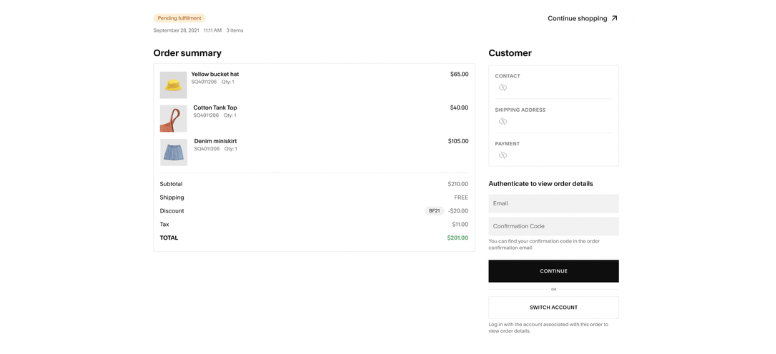
Squarespace Core includes a secure checkout system designed to support smoother online transactions across desktop and mobile devices. The platform integrates directly with payment processors like Stripe, PayPal, and Apple Pay, helping businesses manage payments without complicated third-party checkout systems.
The checkout setup includes:
-
Mobile-optimized payment pages
-
Secure SSL payment processing
-
Integrated payment gateways
-
Faster checkout experiences
-
0% transaction fees on physical products
The 0% transaction fee feature becomes especially valuable for growing ecommerce stores because businesses keep more revenue from every sale. Instead of losing extra percentages through platform fees, stores can reinvest more directly into inventory, marketing, or website growth.
Set up ecommerce checkout through Squarespace Core and create a smoother buying experience for customers across every device.
Promote Your Business Without Extra Marketing Platforms
Promotional Pop-Ups & Announcement Bars: Highlight Important Updates Faster

Squarespace Core includes built-in promotional pop-ups and announcement bars that help businesses promote updates directly across their website. Instead of installing separate marketing plugins, users can create site-wide messages for promotions, newsletter sign-ups, product launches, or limited-time offers from the same dashboard used to manage website content.
Businesses can customize:
-
Fonts and color styles
-
Pop-up timing and display settings
-
Announcement bar messaging
-
Promotional layouts and branding
-
Call-to-action buttons and links
These tools help direct visitor attention toward important updates without interrupting the overall browsing experience. Businesses can also adjust campaigns quickly during sales periods or seasonal promotions.
Promote special offers and keep visitors engaged across your website with Squarespace Core promotional tools.
Discount Codes & Gift Cards: Create Flexible Sales Campaigns

Running promotions becomes easier when discount tools already connect directly to the ecommerce system. Squarespace Core allows businesses to create percentage-based discounts, fixed-price promotions, and product-specific offers without using separate ecommerce extensions.
The platform supports:
-
Percentage and fixed-value discounts
-
Product-specific promotions
-
Category-based discount rules
-
Storewide promotional campaigns
-
Digital gift card purchases
Gift cards also help businesses generate additional revenue during holidays, launches, and seasonal events because customers can purchase store credit directly from the website. Businesses can manage discounts and promotional campaigns inside one system instead of relying on third-party sales tools.
Launch targeted promotions through Squarespace Core and create more flexible ecommerce campaigns throughout the year.
Squarespace Email Campaigns: Manage Marketing and Content Together

Squarespace Email Campaigns allow businesses to create newsletters directly from the platform while keeping website content and email marketing connected. Users can pull blog posts, product listings, images, and website content into campaigns without manually rebuilding layouts inside separate email software.
The platform includes:
-
Mobile-optimized email templates
-
Integrated blog and product content
-
Customizable layouts and branding
-
Open rate and click tracking
-
Conversion and engagement analytics
Keeping email campaigns connected to the website also helps maintain stronger branding consistency across marketing channels. Businesses can launch announcements, product updates, and promotional emails faster while tracking performance directly inside the platform dashboard.
Manage newsletters, promotions, and website content together with Squarespace Email Campaigns from one connected platform.
Create a Smoother Checkout Experience from Cart to Delivery
Real-Time Shipping Quotes: Give Customers More Accurate Costs

Squarespace Core integrates with shipping carriers such as USPS, FedEx, and UPS to provide real-time shipping quotes at checkout. Customers can immediately see accurate delivery costs before placing an order, helping reduce unexpected pricing at the final purchase stage.
Businesses can also create flexible shipping rules based on store needs and promotional campaigns.
Shipping options include:
-
Real-time carrier shipping rates
-
Flat-rate shipping rules
-
Free shipping promotions
-
Shipping cost customization
-
Mobile-friendly checkout calculations
Providing accurate shipping information early in the checkout process helps create a smoother customer experience and reduces friction before payment. Businesses can also adjust shipping strategies during sales events or seasonal campaigns.
Set up flexible shipping options through Squarespace Core and create a more transparent checkout experience.
Multiple Payment Gateways: Support Faster and More Flexible Checkout

Squarespace Core supports multiple payment gateways that help businesses accept payments across different customer preferences and devices. The platform integrates directly with Stripe, PayPal, and Apple Pay, allowing customers to complete transactions using credit cards, digital wallets, and other supported payment methods.
The checkout system includes:
-
Stripe integration
-
PayPal support
-
Apple Pay compatibility
-
SSL-secured transactions
-
Mobile-optimized payment pages
The mobile-friendly checkout design also helps simplify payments for customers shopping on phones and tablets. Businesses can manage transactions more efficiently while keeping payment processing centralized inside the same ecommerce system.
Connect multiple payment gateways through Squarespace Core and create a smoother checkout process across every device.
Abandoned Cart Recovery: Bring Customers Back to Complete Purchases

Customers often leave products in their cart before finishing checkout, especially during longer shopping sessions. Squarespace Core includes abandoned cart recovery tools that automatically send reminder emails to customers who exit before completing their purchase.
Businesses can customize recovery emails with:
-
Promotional discount codes
-
Product reminders
-
Personalized messaging
-
Return-to-cart links
-
Branded email formatting
These automated reminders help recover potential sales without requiring manual follow-up from store owners. Businesses can also refine recovery campaigns over time based on customer engagement and conversion activity.
Reconnect with shoppers through Squarespace Core abandoned cart recovery tools and encourage more customers to complete their purchases.
Build a Website That Supports Long-Term Growth
Ecommerce Analytics: Track What Drives Sales

Squarespace Core includes ecommerce analytics tools that help businesses monitor store performance without relying on separate reporting platforms. Merchants can track product sales, customer behavior, conversion activity, and overall revenue directly from the dashboard. These insights help businesses identify which products perform well and which areas may need stronger marketing or pricing adjustments.
The analytics dashboard tracks:
-
Conversion rates
-
Average order value
-
Revenue by product
-
Traffic sources and referrals
-
Customer location and device usage
Access to real-time store data helps businesses make faster decisions based on actual customer activity instead of guesswork. Businesses can also adjust campaigns and inventory more efficiently as trends change.
Track sales patterns, customer activity, and product performance with Squarespace Core analytics tools to support smarter business decisions over time.
Integrations with Mailchimp & Zapier: Connect the Tools You Already Use
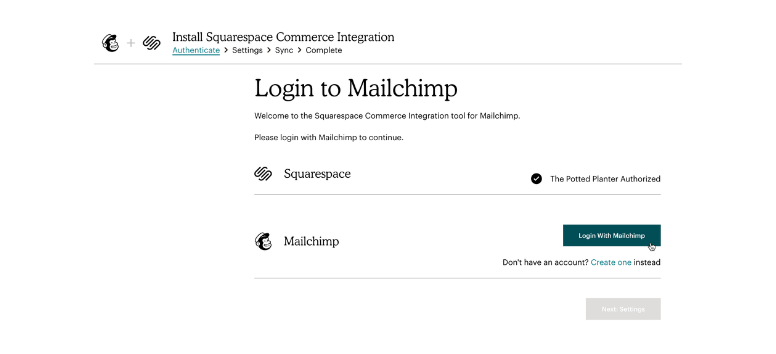
Squarespace Core supports integrations with platforms like Mailchimp and Zapier, helping businesses automate workflows without rebuilding their existing systems. These integrations allow website activity, customer information, and ecommerce data to move more smoothly between platforms.
Businesses can connect workflows for:
-
Email marketing automation
-
CRM lead management
-
Order and inventory syncing
-
Accounting software updates
-
Customer follow-up automation
Zapier also connects Squarespace with thousands of third-party applications, which gives businesses more flexibility as operations grow. Instead of manually transferring information between systems, users can automate repetitive tasks and keep workflows more organized.
Connect Squarespace Core with Mailchimp and Zapier to simplify operations and reduce manual admin work.
Scaling with Unlimited Bandwidth & Storage: Support Growth Without Resource Limits
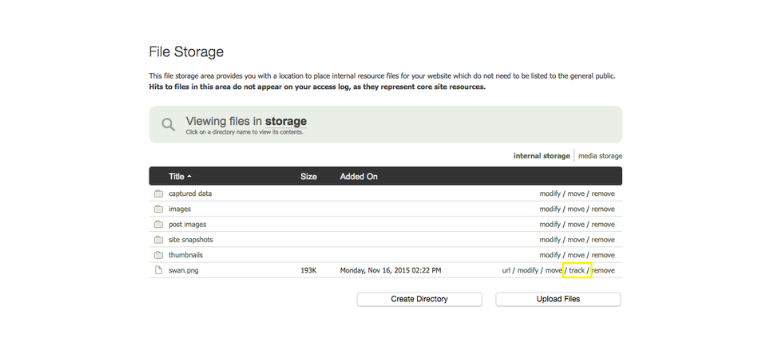
Website traffic and content demands usually increase as businesses grow online. Squarespace Core supports that growth with unlimited bandwidth and storage, allowing businesses to expand product catalogs, upload media, and handle traffic increases without worrying about platform limits.
The platform supports:
-
Large image libraries
-
Expanded product catalogs
-
Video hosting and media uploads
-
High-traffic sales periods
-
Long-term website scaling
Unlimited resources become especially useful during product launches, promotional campaigns, and seasonal sales when traffic spikes can place extra pressure on website performance. Businesses can continue expanding their website without constantly monitoring storage usage or bandwidth restrictions.
Scale your website with Squarespace Core and support long-term business growth without resource limitations.
Build Together Without the Workflow Chaos
Unlimited Contributors: Give Your Team Room to Work Together

Squarespace Core supports unlimited contributors, which gives growing businesses more flexibility when multiple people need access to the website. Instead of limiting collaboration to only a few accounts, teams can invite designers, marketers, content writers, ecommerce managers, and administrators to work inside the same platform.
Businesses can support teams handling:
-
Website design updates
-
Blog publishing and content uploads
-
Product and inventory management
-
Marketing campaigns and promotions
-
Analytics and performance tracking
Each contributor receives their own login credentials, which helps businesses organize responsibilities more clearly across departments. Teams can continue scaling operations without constantly managing contributor limits or shared accounts.
Add unlimited contributors through Squarespace Core and create a more collaborative website management process.
Role-Based Permissions: Control Access Across Different Teams
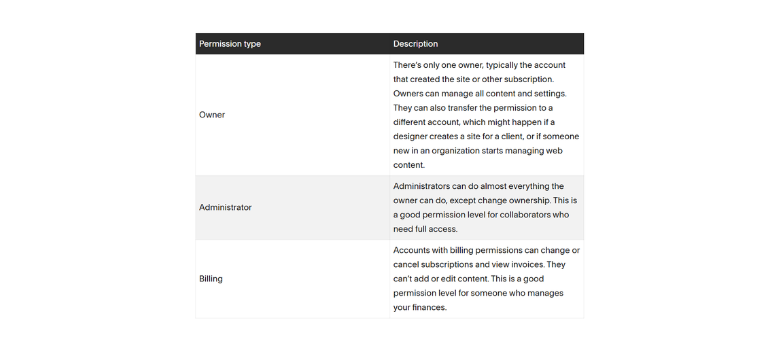
Squarespace Core includes role-based permissions that help businesses control which team members can edit, publish, manage billing, or oversee ecommerce settings. Instead of giving every contributor full website access, administrators can assign permissions based on each person’s responsibilities.
The platform supports roles such as:
-
Administrator
-
Content Editor
-
Billing Manager
-
Store Manager
-
Website Contributor
This permission structure helps reduce accidental changes to important website settings while allowing teams to work more efficiently within their assigned areas. Businesses can maintain stronger oversight across content, ecommerce, marketing, and operational tasks without slowing down collaboration.
Use Squarespace Core role permissions to organize teams and manage website access more securely.
Streamlined Workflows: Keep Teams Working Inside One Platform

Managing website projects across disconnected tools often leads to delays, duplicate work, and communication issues. Squarespace Core simplifies collaboration by centralizing website management, ecommerce tools, analytics, design controls, and marketing features inside one dashboard.
Different teams can focus on separate responsibilities, including:
-
Designers handling layouts and branding
-
Marketers managing campaigns and pop-ups
-
Ecommerce teams updating products and orders
-
Administrators monitoring analytics and operations
-
Content teams publishing blogs and updates
Real-time updates help teams view changes immediately after edits go live, which keeps projects moving more smoothly during website updates and campaign launches. Businesses can manage workflows more efficiently without switching between multiple systems.
Streamline team collaboration with Squarespace Core and keep website operations organized in one connected workspace.
Squarespace Core simplifies website creation by bringing design tools, ecommerce features, marketing systems, analytics, and team collaboration into one connected platform. Instead of managing multiple services separately, businesses can build pages, launch online stores, manage content, process payments, and track performance from a centralized dashboard that stays easy to navigate as operations grow.
The Core plan also gives businesses more flexibility beyond basic website setup through advanced customization tools, unlimited contributors, built-in SEO features, and 0% transaction fees on physical products. From first-time website launches to long-term ecommerce growth, Squarespace Core creates a smoother path for businesses that want professional tools without the usual technical complexity. Explore Squarespace Core and build a website that stays easier to manage as your business expands.