McAfee Review 2026: Is It Still Worth Buying?
 By Jordan Midea
 Software
McAfee remains a strong security buy in 2026 because it tackles far more than basic antivirus threats. Its plans can cover malware, dangerous links, online scams, identity exposure, privacy risks, and unsecured connections, while newer AI-powered tools target the increasingly convincing tricks used in texts, emails, QR codes, and social messages. For households and everyday users who want broad protection in a single service, McAfee still makes a compelling case. Read this McAfee review 2026 and see why its current features justify the investment.
Keep Me Private Online
Personal Data Cleanup: Reduce What Data Brokers Know About You-https://www.mcafee.com/learn/personal-data-cleanup/
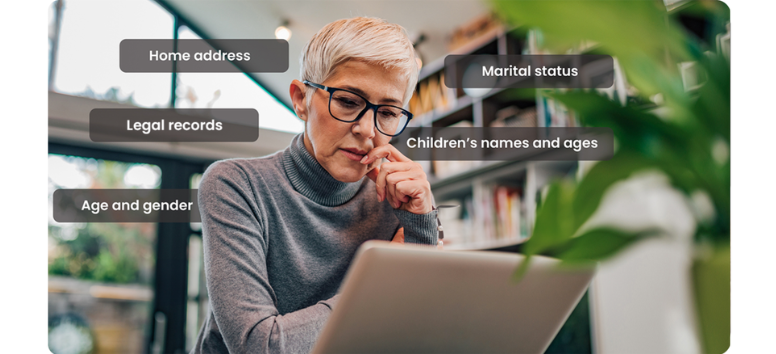
McAfee’s Personal Data Cleanup scans data broker and people-search sites in the US, UK, Canada, and Australia to find personal information that may be collected or sold. Users can request removals manually, while eligible Full Service plans submit and track requests on their behalf.
Key functions include:
-
Data broker scanning
-
Manual removal guidance
-
Automated removal requests on eligible plans
-
Progress tracking and quarterly rescans
Since removals can take weeks or months, ongoing monitoring matters. Choose the right McAfee plan and start reducing the personal data exposed across broker sites.
Online Account Cleanup: Shut Down the Accounts You Forgot Existed-https://www.mcafee.com/learn/online-account-cleanup/ https://mcafee.sjv.io/c/4081785/3762821/44522?subId1=blog

Old signups tend to pile up. McAfee’s Online Account Cleanup scans for unused or risky accounts linked to your email, then points you toward ways to delete them and remove stored personal data. McAfee says the average person may collect around 350 online accounts over time.
Key functions include:
-
Account discovery through email scanning
-
Guidance for deleting unused accounts
-
Personal data removal support
-
Full Service deletion requests with McAfee+ Ultimate
Full Service can save 10 hours or more of manual effort. Cut loose the accounts gathering digital dust and leave fewer forgotten doors open to your personal information.
VPN: Put Public Wi-Fi Behind an Encrypted Wall

Coffee shops, airports, and hotels make it easy to connect, but open networks can expose sensitive activity. McAfee Secure VPN encrypts internet traffic with AES-256 protection, while premium plans may include unlimited bandwidth and a kill switch. Auto-connect can also activate the VPN when a device joins public Wi-Fi.
Key features include:
-
AES-256 encryption
-
Automatic connection on public Wi-Fi
-
Kill switch protection
-
Coverage for up to five devices
-
Servers across roughly 23 countries
McAfee Secure VPN works on PCs, Macs, phones, and tablets, adding privacy wherever you browse. Switch it on before the café Wi-Fi does more snooping than your morning coffee deserves.
Social Privacy Manager: Take Back Control of What Social Media Reveals 
Privacy menus can bury important settings under layers of confusing options. McAfee’s Social Privacy Manager adjusts more than 100 settings across Facebook, Instagram, LinkedIn, X, Google, YouTube, and soon TikTok, then recommends changes based on how you use social media.
It can guide settings for:
-
Location sharing
-
Profile and post visibility
-
Audience restrictions
-
Platform use of personal data
-
Different social habits, from Unplugged to Socializer
McAfee research found that 46% of users never adjust privacy settings, often because the process feels too complex. Tune your accounts before oversharing becomes the default, and decide who gets a front-row seat to your digital life.
Safeguard My Identity
Identity Monitoring: Catch Exposure Before Criminals Can Use It

Identity theft often starts long before a suspicious charge appears. McAfee’s Identity Monitoring scans the dark web 24/7 for exposed personal data and sends alerts when it finds a match. McAfee says its warnings arrive an average of 10 months earlier than similar services.
Monitoring can cover:
-
Government IDs and Social Security numbers
-
Passport and driver’s license numbers
-
Credit card and bank account details
-
Email addresses and phone numbers
-
Usernames, tax IDs, and insurance IDs
Alerts include guidance on what to do next, while select plans also include identity restoration support. Put your most sensitive details on watch now, before stolen data gets a head start.
Credit Monitoring: Spot Suspicious Changes Before They Snowball

Unexpected credit activity can signal trouble long before identity theft becomes obvious. McAfee’s Credit Monitoring tracks changes to your credit score, reports, and accounts, then sends timely alerts when it detects activity that may need attention.
From one place, users can:
-
View credit scores and reports
-
Track account changes
-
Receive alerts about unusual activity
-
Follow guidance when fraud may be involved
-
Access identity restoration support with select plans
The real value lies in speed. A strange account update deserves attention, not a surprise months later. Put your credit activity under watch and catch questionable changes while there’s still time to act.
Security Freeze: Put New Account Openings on Ice

Identity thieves may use stolen details to apply for credit, loans, utilities, or bank accounts in someone else’s name. McAfee’s Security Freeze feature guides users through placing freezes with the relevant credit bureaus, restricting access to their credit profile and interrupting many new-account applications. A freeze doesn’t affect the credit score.
The process covers:
-
Online freeze requests
-
Temporary unfreezing before legitimate applications
-
Alerts when freeze status changes
-
Restrictions on credit profile access
Need financing later? Lift the freeze before applying, then restore it afterward. Lock down your credit profile now and make stolen personal details far less useful at the point of application.
Identity Theft Coverage: Get Backup When Recovery Gets Expensive

Identity theft can trigger legal fees, travel costs, stolen funds, and hours of recovery work. McAfee’s Identity Theft Coverage adds financial support and hands-on restoration assistance after a confirmed identity theft case, with coverage of up to $2 million under eligible plans.
Support may include:
-
24/7 licensed identity restoration specialists
-
Limited power of attorney for recovery steps
-
Reimbursement for covered legal and travel expenses
-
Stolen funds reimbursement
-
Lost Wallet Protection for IDs and payment cards
When identity theft becomes a real-world crisis, expert support can be as important as early detection. Put a recovery plan in place before fraud leaves you sorting through the damage alone.
Password Manager: Trade Password Chaos for One Secure Vault
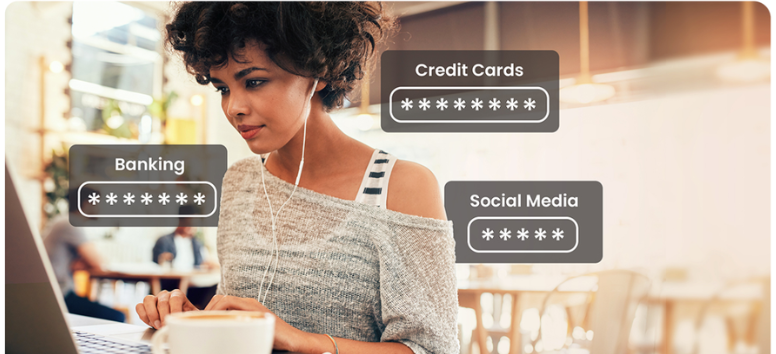
Reusing passwords may save a few seconds, but one exposed login can put several accounts at risk. McAfee’s Password Manager generates strong, unique passwords, stores them securely, and auto-fills credentials across supported devices. Instead of memorizing a long list of logins, users remember one primary password.
Core functions include:
-
Strong password generation
-
Secure credential storage
-
Auto-fill for faster logins
-
Cross-device access
-
One primary password for the vault
For anyone juggling dozens of accounts, the setup reduces the need for sticky notes, repeated passwords, and frantic reset emails. Retire the “same password everywhere” habit and lock each account with its own stronger password.
Protect My Devices
Antivirus: Put 24/7 Protection Between Your Devices and New Threats
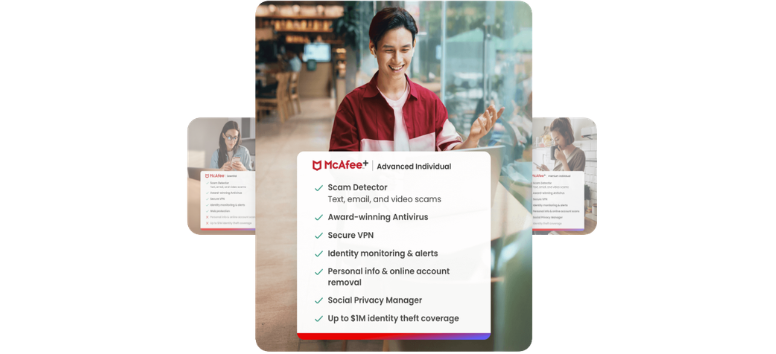
McAfee Antivirus uses AI-assisted detection and around-the-clock protection to identify and remove viruses, malware, and other threats across supported devices. Users can run real-time, scheduled, or on-demand scans, while the Advanced Firewall adds another layer of home network security.
Core protection includes:
-
AI-powered threat detection
-
Real-time and scheduled scanning
-
Virus and malware removal
-
Advanced Firewall protection
-
Coverage for PCs, phones, and tablets
Select plans cover five devices, while McAfee+ Premium and Advanced Individual support unlimited devices. McAfee also backs eligible plans with a virus removal guarantee under stated terms. Put your everyday tech under a single security setup and stop treating each device as a separate battlefront.
Scam Protection: Catch the Trick Before It Costs You

Scams now hide in texts, emails, videos, social messages, and QR codes. McAfee Scam Protection uses AI-powered detection to spot suspicious content, send fast alerts, and block risky links, even after a click. Every McAfee plan includes scam alerts plus on-demand QR code scanning.
Protection covers:
-
Text and email scam detection
-
Risky link blocking
-
Video and deepfake scam alerts
-
On-demand social message checks
-
QR code scanning
-
Adjustable text scam detection levels
The feature tackles a problem antivirus alone can miss: messages designed to fool people, not infect devices. Put suspicious messages through McAfee first and leave scammers talking to a closed door.
Web Protection: Steer Clear of Risky Sites Before Trouble Loads

A mistyped URL, fake download button, or malicious link can send a browser somewhere dangerous fast. McAfee’s Web Protection uses the WebAdvisor browser extension to flag risky websites, block known phishing and malware pages, and scan downloads for known threats.
Key functions include:
-
Warnings for dangerous websites
-
Phishing and malware site blocking
-
Alerts for mistyped web addresses
-
Download scans for known risks
-
Browser-based guidance while surfing
The feature adds a useful checkpoint during everyday browsing, especially when search results and links look convincing at first glance. Put WebAdvisor on patrol and leave suspicious pages stuck outside the browser door.
Protect My Family
Protection Score: See Where Your Online Security Stands
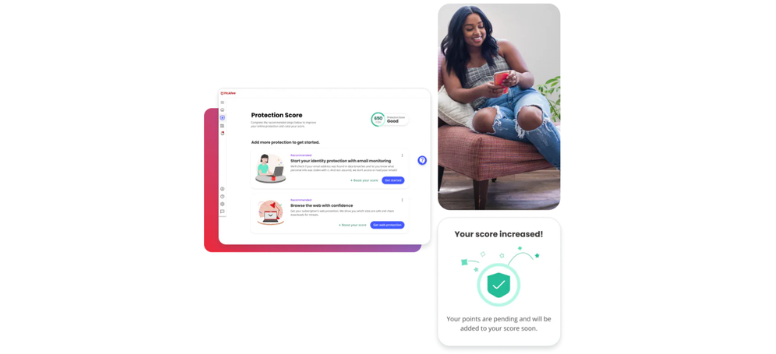
McAfee’s Protection Score measures the health of your online security and points out gaps that may need attention. Included with McAfee Total Protection, the score appears in the McAfee Protection Center and changes as users strengthen or resolve parts of their setup.
Your score can respond to actions such as:
-
Running antivirus scans
-
Securing more devices
-
Installing web protection
-
Adding details to identity monitoring
-
Resolving exposed data found in breaches
A new breach or dark web exposure may lower the score, while completed security actions can raise it again. Treat the number like a digital checkup and turn overlooked weak spots into a shorter to-do list.
Parental Controls: Set Smarter Boundaries for Growing Screens

Kids move between games, schoolwork, videos, and social apps all day, often across several devices. McAfee’s Parental Controls give parents a clearer way to manage digital habits, restrict unsuitable content, and stay aware of location activity.
Key controls include:
-
Content limits and website restrictions
-
Screen time management
-
Remote device controls
-
Map-based child location viewing
-
Arrival and departure alerts
Family plans add these tools to McAfee’s broader security setup, simplifying oversight for busy households. Set the guardrails now, then leave more room for kids to explore the online world without handing the internet a free pass.
Family Plans: Give Everyone Their Own Security Space

McAfee+ Family plans cover up to six family members under one subscription, while each person receives separate identity, privacy, and device protection. Individual alerts and guidance also keep security actions tied to the right account, rather than crowding everyone into a single shared profile.
Family coverage can include:
-
24/7 identity monitoring
-
Secure VPN access
-
Unlimited device security
-
Personalized Protection Score guidance
-
Credit and financial monitoring for eligible adults
-
Parental controls
Up to two adults may each receive up to $2 million in identity theft coverage, for up to $4 million per family, plus licensed restoration support on eligible plans. Put the household under a single plan without treating every family member as the same kind of user.
Why McAfee Still Earns Its Place in 2026

McAfee backs its long track record with newer technology built for today’s risks. AI-powered antivirus, Scam Protection, financial monitoring, privacy tools, and identity coverage push the service well beyond basic malware defense. McAfee also reports 3x faster scans and 10x more firewall protection against malicious outbound connections with its latest technology.
Its wider case includes:
-
100 million customers across 180+ countries
-
AI-fueled antivirus and scam detection
-
Credit, bank, and investment account monitoring
-
Personal data and privacy controls
-
Up to $2 million in identity theft coverage on eligible plans
-
Recognition from AV-TEST, Newsweek, and other industry groups
For anyone seeking a single security platform rather than a patchwork of separate tools, McAfee remains a persuasive 2026 choice. Pick the plan that matches your household and put its full protection suite to work.
Viruses are still around, but scams, stolen data, risky links, identity theft, and exposed accounts now demand more attention. McAfee addresses the broader threat landscape with tools built around real browsing habits, family use, privacy concerns, and financial risk. For users who prefer a single security platform over several scattered services, the value is clear. Take a closer look at McAfee’s 2026 plans and choose the level of protection that fits how you actually live online.