Hotels.com UK Black Friday Deals 2026: How to Find Member Prices and Flexible Hotel Stays
 By Jordan Midea
 Services
Black Friday hotel shopping can become noisy in minutes. Prices move quickly, and every room seems to demand an instant decision. A calmer search usually works better. Start with your dates, compare equivalent rooms, and read the rate conditions before paying. The Hotels.com UK Black Friday deals page is a useful place to check 2026 offers, including Member Prices and selected stays with free cancellation. This guide explains the UK rewards programme and the booking details that matter.
Why Hotels.com Black Friday Deals Deserve an Early Look

Hotels.com describes Black Friday as its biggest sale of the year. Its UK page also covers Cyber Monday and Travel Tuesday, so offers may appear across several shopping dates rather than on one Friday alone.
The sale may include city hotels, all-inclusive resorts, VIP Access properties, and last-minute stays. Hotels.com UK highlights destinations such as Greece, Spain, Portugal, and Paris, although the available properties will depend on your dates and current room inventory.
At the time of writing, the official UK page does not present one universal 2026 discount that applies to every hotel. Prices and promotional terms may change by property, room, destination, and travel period.
Early research gives you a price reference. Search your dates, save suitable hotels, and note the current total. When the sale begins, compare real figures instead of relying on a crossed-out price.
Browse Hotels.com UK Black Friday deals and start a shortlist before the busiest booking days arrive.
Sign In Before Comparing Prices
Hotels.com Rewards is free to join in the UK. Signed-in members can access Member Prices on selected properties and dates, so searching as a guest may hide rates linked to membership.
Hotels.com UK states that members can save up to 20% on selected hotels through Member Prices. The words “up to” and “selected” are important. A 20% reduction will not appear on every listing, room, or travel date.
Sign in before starting your search and check that the correct region is displayed. The address should begin with uk.hotels.com, prices should appear in pounds when GBP is selected, and the rewards area should refer to Hotels.comCash.
Enter the exact number of adults and children too. Occupancy can change the room choices, displayed rate, and local charges. A room offered to one traveller may not be available at the same price for a family.
Join Hotels.com Rewards UK before comparing eligible Member Prices.
What Is a Hotels.com Member Price?

A Member Price is a discounted rate available to signed-in Hotels.com Rewards members and app users. It appears only when an eligible property and date match the search.
The discount badge is one detail, not the whole booking. Open the hotel page and inspect the complete stay price. Check the room name, bed type, included meals, payment timing, and cancellation conditions. Look for any taxes or property charges due later.
Two rates at the same hotel may cover very different reservations. One could include breakfast and free cancellation. Another might require immediate payment and offer no refund after confirmation. Compare equivalent rooms before deciding which price is lower.
Member Price reservations follow the change and cancellation terms attached to the selected booking. Membership does not automatically turn a restricted room into a flexible one.
View Hotels.com UK member deals and compare each rate using the same dates, guest count, and room details.
The UK Rewards Programme Works Differently
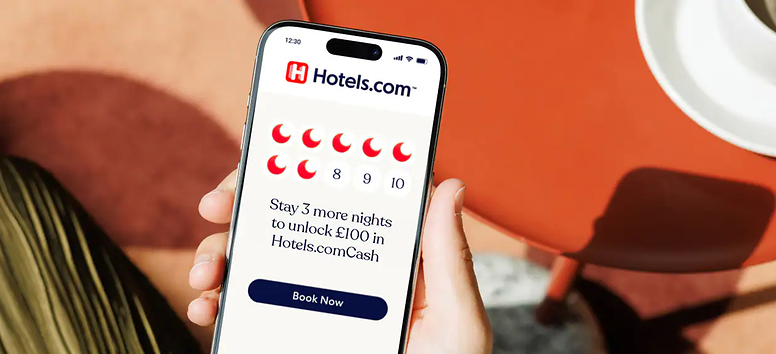
Hotels.com UK has its own rewards structure. Members collect one eligible night for each qualifying night they complete. After 10 eligible nights, they receive £100 in Hotels.comCash.
For a night to count, the average nightly cost must be at least £75, including eligible taxes and fees paid to Hotels.com. Nights used to redeem Hotels.comCash and certain booking types do not qualify.
The 10 nights can come from several eligible trips. Progress may expire after 12 months without eligible account activity. The programme also has Blue, Silver, Gold, and Platinum tiers, with tier status based on eligible nights completed during the year.
What Can You Do With Hotels.comCash?
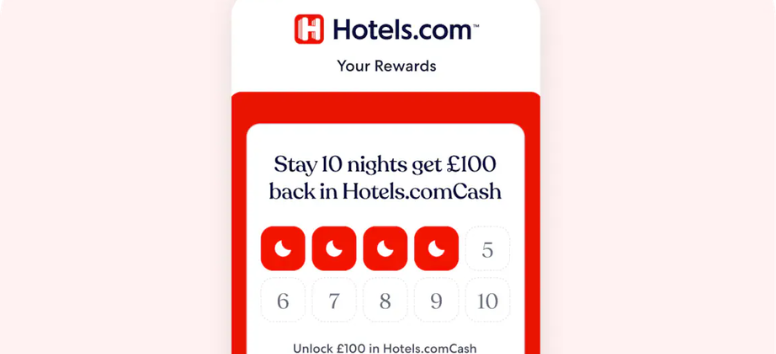
Hotels.comCash is the rewards currency used by the UK programme. One pound of Hotels.comCash has a value of £1 towards an eligible booking.
Members may use the £100 reward in one transaction or apply part of it and keep the remaining balance for another eligible stay. Hotels.com UK states that eligible Hotels.comCash use has no blackout dates, though the selected reservation must meet the redemption conditions.
To redeem it, sign in and choose an eligible Pay Now property. Pay Later reservations, package bookings, and some holiday rentals may not accept Hotels.comCash. It cannot be transferred to another member or redeemed as cash.
Read the Hotels.com UK rewards details before relying on a stay to earn or redeem Hotels.comCash.
Flexible Hotel Stays Need a Closer Read

Hotels.com UK advertises free cancellation on selected hotels. This does not make every Black Friday booking refundable.
Cancellation terms can change by property, room type, date, and rate. One room may allow free cancellation until a stated deadline. A cheaper option could become non-refundable upon confirmation.
Check the exact date and time shown in the policy. The deadline may follow the hotel’s local time zone, especially for stays outside the UK. Review the no-show rules too. Missing the first night without contacting the property could lead to a fee or cancellation of the remaining stay.
Plans have a habit of shifting, don’t they? A flexible rate deserves attention when flights, annual leave, or group arrangements remain unsettled.
Search Hotels.com UK and use the cancellation filters to find suitable booking terms.
Filters Turn a Huge Sale Into a Useful Shortlist

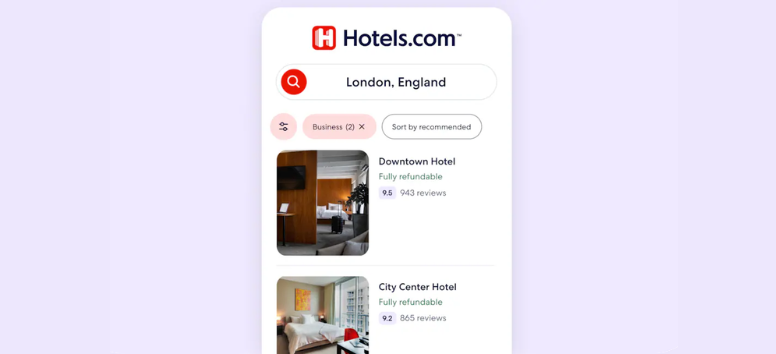
A Black Friday search for London, Paris, or another major destination may return hundreds of options. Filters can reduce that list to properties that match the trip.
Start with the location. A hotel outside the centre may add rail fares, taxi costs, or long daily journeys. Use the map to check its distance from planned attractions, stations, airports, or business venues.
Set a total budget, then choose essential filters such as guest rating, accessibility features, parking, breakfast, or pet-friendly rooms. Begin with the requirements that matter most since strict filters can remove suitable properties.
Use Price Information in Context

Hotel prices can change with demand, room inventory, local events, and booking activity. A city hosting a football match, festival, or major conference may remain expensive through Black Friday.
Search your dates before the event, record the total for a preferred room, and note its cancellation policy. Repeat the search during the promotion using the same details. If a lower price appears, check that it covers the same room and terms.
Keep currency settings consistent. A card provider may add foreign exchange or transaction charges when a hotel collects payment in another currency.
Save Your Way Adds Another Choice
Hotels.com UK members may see Save Your Way on eligible discounted bookings. The feature lets the member apply an eligible Member Price saving immediately or bank the value as rewards for later use.
Availability depends on the property and rate. Banked rewards may remain pending until the qualifying stay is completed. This feature is separate from collecting eligible nights towards the £100 Hotels.comCash reward, so read the displayed terms carefully.
Black Friday, Cyber Monday, or Travel Tuesday?

Hotels.com UK connects its seasonal promotion with Black Friday, Cyber Monday, and Travel Tuesday. Participating properties and rates may change across those dates.
There is no dependable rule that the last shopping day will have the lowest hotel price. Room inventory can disappear as reservations are made. A suitable flexible rate may sell out while a traveller waits for another reduction.
Set a booking target before the promotion begins. Decide on an acceptable total price, a suitable area, and the cancellation terms you need. When a hotel meets those conditions, you have a clear basis for completing the reservation.
After payment, check the confirmation email. Review the dates, guest names, room count, bed choice, payment status, and cancellation deadline. Contact Hotels.com or the property promptly if any information is incorrect.
Common Black Friday Hotel Booking Mistakes
Searching while signed out is an easy mistake. Eligible UK Member Prices may remain hidden until you log in or use the Hotels.com app.
Compare the full stay price because taxes, parking, resort fees, and deposits can change the amount paid. Read the cancellation policy before choosing the cheapest room.
A hotel night will not automatically count towards the UK rewards programme. Eligibility rules still apply. Black Friday discounts and flexible terms also depend on the property and date.
Your Final Booking Check
Before paying, confirm the dates, guest count, room category, included meals, and cancellation deadline. Check the complete price and charges due at the property.
Review recent comments about cleanliness, noise, location, and service. Repeated concerns deserve attention. If you plan to use Hotels.comCash, sign in first and confirm that the Pay Now booking is eligible. Keep the confirmation email and cancellation terms.
Hotels.com UK Black Friday deals in 2026 may include Member Prices, selected flexible stays, app offers, and rewards features. The right booking still depends on the details behind the displayed price.
Start with a small shortlist. Compare equivalent rooms and read the terms before the final click. Check the cancellation deadline, payment schedule, location, and extra charges. A steady search cuts through the sale-day noise and keeps the booking grounded in facts.
Visit the official Hotels.com UK Black Friday page to review current offers, participating properties, and booking terms.