Divoom Halloween Sale 2026: Pixel Displays, Speakers and Desk Setup Deals
 By Rachel Jerris
 Electronics
Desk accessories now cover much more than keyboards, lights and monitor stands. Smart displays can show calendars, weather updates and social statistics, while pixel speakers add audio and customizable visuals without using separate devices.
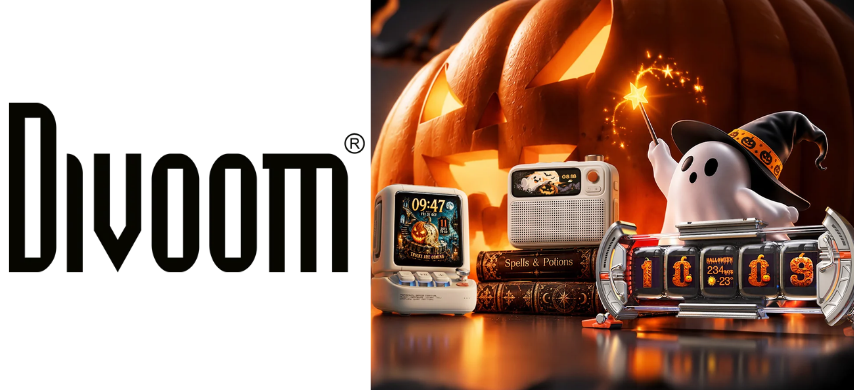
The Divoom Halloween Sale covers four products from this growing category: Astrotoo, Times Frame, FlowToo and Times Gate. The promotion includes three bundles and four standalone offers, with savings of up to $90.
Each product serves a different part of a setup. Astrotoo focuses on desktop audio and pixel content. Times Frame displays photos, videos and information widgets. FlowToo combines bedside audio with alarm and relaxation features. Times Gate acts as a five-screen desktop dashboard.
Pair Desktop Audio With a Larger Display: Astrotoo and Times Frame
Offer: Save $90 with code ASTF90
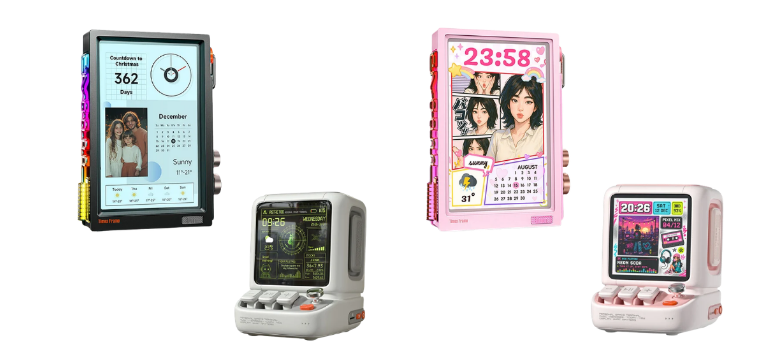
Pair the Astrotoo and Times Frame Desk Setup Bundle to cover audio, pixel content, photos and desktop information across two displays.
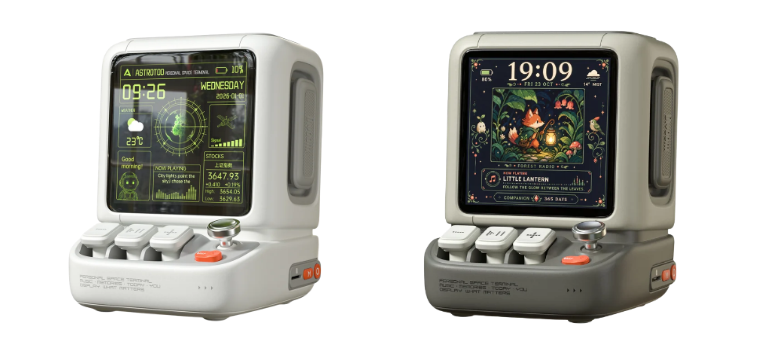
Play music, game audio or videos through Astrotoo’s 20W speaker while using its 3.95-inch screen for pixel art, clocks and music visualizers. Physical keys and a joystick provide direct control, while Bluetooth, Wi-Fi and MicroSD playback support several audio sources.
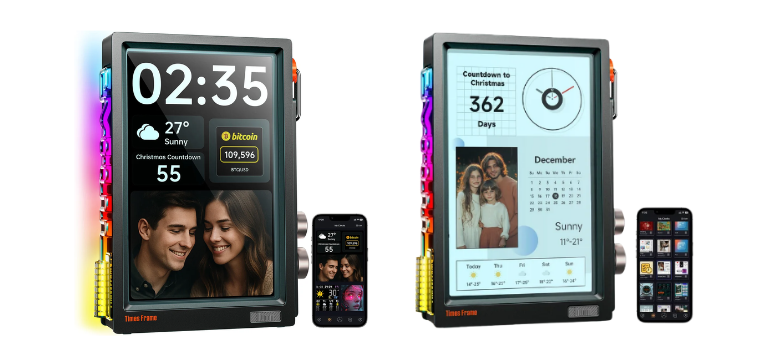
Display photos, short videos, calendars, weather information and countdowns on the larger Times Frame screen. Its transparent IPS panel creates a layered appearance that makes images look suspended inside the frame.
Coordinate both displays through the Divoom ecosystem to show matching artwork, colours or seasonal content. After the promotion, you can replace Halloween designs with personal photos, work widgets, or everyday clock faces.
The bundle suits home offices, creator desks and gaming stations that need a speaker and a larger digital display.
View the Astrotoo and Times Frame bundle and enter ASTF90 at checkout to save $90.
Build a Gaming Dashboard: Astrotoo and Times Gate
Offer: Save $70 with code ASTG70
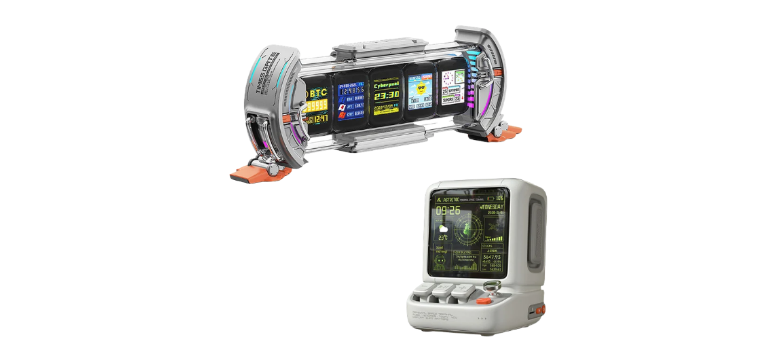
Combine the Astrotoo and Times Gate Premium Desk Setup Bundle to add desktop audio and a five-screen information display to a gaming or creator workspace.
Use Astrotoo for 20W near-field audio while keeping music controls, clocks, pixel art and visualizers within reach. Its physical joystick and buttons provide tactile control without opening the mobile app for every adjustment.
Arrange different information across Times Gate’s five 128-by-128 LCD screens. Supported content includes weather, world clocks, calendar details, stock data, cryptocurrency prices and selected social statistics. Each screen can also show separate pixel art or animated content.
Adjust the dual-edge ambient lighting using 12 RGB effects. This can help Times Gate match a keyboard, desktop lighting system or seasonal room theme.
The bundle is most relevant to streamers, gamers, programmers and creators who want visible data beside their monitor without using part of the main computer screen.
View the Astrotoo and Times Gate bundle and use code ASTG70 to save $70.
Extend Audio From the Desk to the Bedside: Astrotoo and FlowToo
Offer: Save $65 with code ASTT65
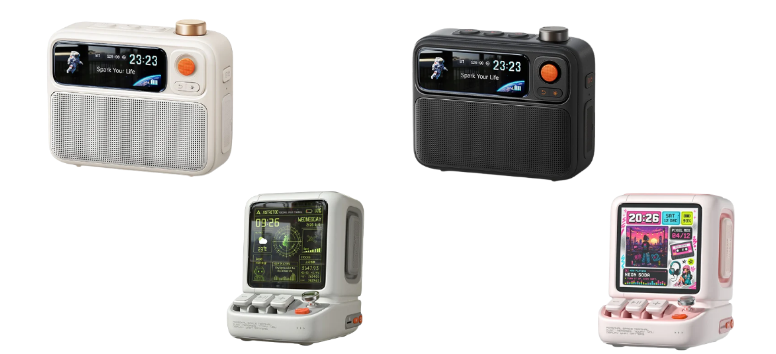
Extend audio across two rooms with the Astrotoo and FlowToo Desk and Bedside Speaker Bundle.
Place Astrotoo beside a monitor for music, gaming, videos and visual content. Its 20W speaker is designed for desktop listening, while the 3.95-inch display can show pixel art, photos, clock faces and music visualizers.
Position FlowToo beside the bed as a 10W Bluetooth speaker, alarm clock and white-noise machine. Its sound library includes more than 90 white-noise and relaxation options. Alarm settings support natural sounds, rising volume and a gradual light transition.
Personalize both products through the Divoom app. Astrotoo can carry a brighter gaming or work theme, while FlowToo can use quieter clock faces, sleep scenes and mood lighting.
This bundle suits someone who wants separate devices for daytime work and evening use instead of moving one speaker between rooms.
View the Astrotoo and FlowToo bundle and enter ASTT65 to save $65.
Play Music and Pixel Art With Divoom Astrotoo
Offer: Save $40 with code AST40
Play music, games and video audio through the Divoom Astrotoo, a compact 20W speaker designed for close-range desktop listening.
View pixel art, photos, clock faces and music visualizers on its 3.95-inch, 480-by-480 display. Change the content through the Divoom app to suit work hours, gaming sessions or seasonal decorating.
Control playback and on-screen functions through physical keys and a joystick. These controls allow quick adjustments without adding another touchscreen to the desk.
Connect Astrotoo through Bluetooth 6.0 or Wi-Fi, or play compatible content from a MicroSD card. The built-in battery supports up to six hours of use, while USB-C charging takes about 3.5 hours.
Fit the speaker into smaller workspaces with its 106-by-108-by-135-millimetre body. It weighs about 640 grams and comes in several colours.
Astrotoo makes the most sense for someone who already needs a desktop speaker but also wants clocks, artwork and visual information in the same footprint.
View Divoom Astrotoo and use code AST40 to save $40.
Display Photos, Videos and Widgets With Times Frame
Offer: Save $40 with code TMSF40
Display photos, short videos and useful information on the Divoom Times Frame, a Wi-Fi digital frame with a transparent IPS screen.
Upload personal media through the Divoom app, then arrange it alongside clocks, calendars, weather information, countdown timers, finance tickers and pixel art. The transparent screen adds visible depth instead of presenting content against a standard flat background.
Store a large local media library using the built-in 64GB capacity. Divoom states that this can hold more than 700,000 images or around 6,000 minutes of video, though actual capacity will depend on individual file sizes.
Choose from more than 400 clock-face designs or use productivity tools such as timers and calendar displays. Supported widgets can also show selected live information, such as market data or channel statistics.
Share access with approved users so family members or friends can send content to the display. Times Frame can continue showing stored slideshows if Wi-Fi becomes unavailable after the content has been transferred.
Use the screen for Halloween art and countdowns during October, then switch to family photos, work information or holiday content later in the year.
View Divoom Times Frame and enter TMSF40 at checkout to save $40.
Set Alarms and Relaxation Sounds With FlowToo
Offer: Save $20 with code TFT20
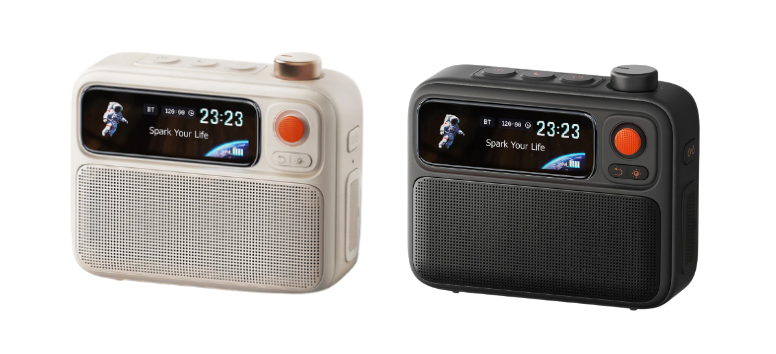
Use the Divoom FlowToo as a Bluetooth speaker, white-noise machine and alarm clock without placing three separate devices on the nightstand.
Play audio through its 10W speaker and 45mm full-range driver. Select from more than 90 white-noise and relaxation sounds for sleeping, reading or focused work.
Set alarms with natural sounds, rising volume and a gradual light transition. These options provide more control than a basic alarm tone that starts at full volume.
Check the time and visual content on the 2.26-inch smart display. Supported screen options include clock faces, sleep scenes, mood lighting and music visualizers.
Manage alarms, sounds and display preferences from the Divoom app. The compact format also works on a small desk, bookshelf or side table when bedside features are still useful.
Choose FlowToo over Astrotoo when sleep sounds, alarms and a smaller screen matter more than higher speaker output and desktop controls.
View Divoom FlowToo and use code TFT20 to save $20.
Track Information Across Five Screens With Times Gate
Offer: Save $20 with code TGT20
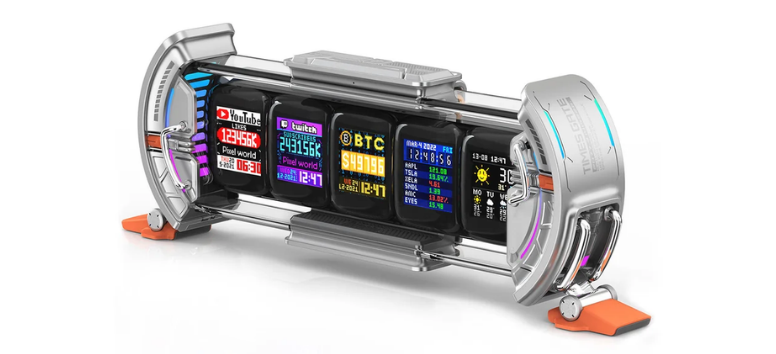
Track clocks, weather updates and selected online statistics on the Divoom Times Gate, a horizontal smart display fitted with five full-colour LCD screens.
Assign separate content to each 128-by-128 screen. One screen might show the time, while the others display weather, calendar information, pixel art or supported live data.
Monitor selected stock prices, cryptocurrency information, YouTube subscribers, Twitch followers and game statistics through compatible widgets. Data support can vary by service, region and app availability.
Create individual pixel designs or select animations and clock faces through the Divoom community. Each screen can show different artwork, allowing a single device to present a short visual sequence or several related designs.
Adjust the dual-edge ambient lighting with 12 RGB effects. Colours can be matched with other desk accessories or changed for Halloween, Christmas and other seasonal setups.
Connect Times Gate through 2.4GHz Wi-Fi and manage it through the Divoom app. It does not use Bluetooth and has no built-in battery. Continuous power is required, so it is intended to remain on a desk rather than move between rooms.
Choose Times Gate for an information-heavy setup. Choose Times Frame instead when photos and larger visual content are the priority.
View Divoom Times Gate and enter TGT20 at checkout to save $20.
Which Divoom Product Fits Your Setup?
Choose Astrotoo if you need desktop audio and want pixel art, clocks and physical controls in the same device.
Choose Times Frame if you want to display photos, videos, calendars, countdowns and larger visual content.
Choose FlowToo if alarms, white noise and bedside audio are more important than a large screen.
Choose Times Gate if you want several clocks, statistics or widgets visible at the same time.
For bundles, choose Astrotoo and Times Frame for audio plus a larger visual display. Select Astrotoo and Times Gate for gaming, streaming or a data-focused workstation. Pick Astrotoo and FlowToo to cover both a desk and a bedroom.
How to Use a Divoom Halloween Promo Code

- Open the linked product or bundle page.
- Select the required colour and available configuration.
- Add the product to the shopping cart.
- Continue to checkout.
- Enter the matching promotional code.
- Check that the saving has been applied before completing the order.
Promo codes may depend on the selected product or bundle. Confirm the final price, stock status, shipping destination and code application during checkout.
Astrotoo handles audio and interactive pixel content. Times Frame focuses on photos, video and widgets. FlowToo provides bedside sound and alarm functions, while Times Gate keeps several pieces of information visible across five screens.
Review the features first, then select the standalone product or bundle that matches the space. The highest saving may look tempting, but the most useful offer is the one that fills an actual gap in the setup.
Explore the Divoom Halloween Sale and confirm that the required promotional code appears correctly before placing the order.