Best EndNote Research & Citation Tools
 By Gabi Thompson
 Services
Research tends to sprawl. Articles stack up, PDFs get buried, and tracking sources turns into its own task. EndNote stands out as a long-established reference management software built for that exact problem, giving researchers a structured way to collect, organise, and cite materials without losing control of their workflow.
Citation tools carry real weight in academic writing. They support accuracy, protect credibility, and ensure every source is properly acknowledged. EndNote handles the technical side with consistency, from building reference libraries to generating citations and bibliographies inside your document. Instead of switching between files and formats, your research, notes, and references stay connected, making the entire process more efficient and easier to manage.
EndNote, Unpacked — The Engine Behind Organized Research

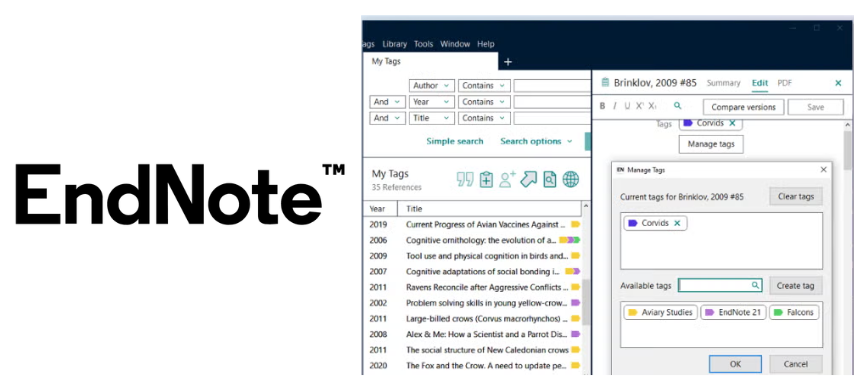
EndNote, developed by Clarivate Analytics, the team behind Web of Science and Journal Citation Reports, is designed for researchers who need structure without slowing down their work. It’s widely used by students, authors, and editors who manage large volumes of sources and want a reliable way to organise references, notes, and citations in one place.
Available on Windows and Mac, with flexible student and institutional licensing options, it adapts to different academic environments with ease. It also integrates smoothly with writing tools, keeping your research connected from start to finish. Build a more efficient, organised workflow with EndNote today.
AI Research Assistant — Answers, Summaries, and Translation in One Flow
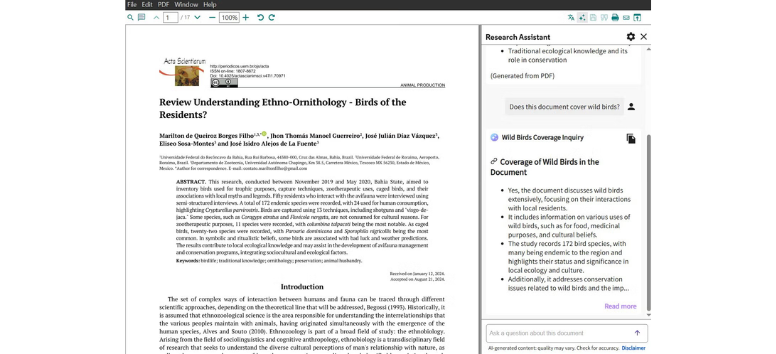
EndNote’s Research Assistant brings AI directly into your document, so you’re not switching tabs or second-guessing sources. You can ask questions in plain language and get answers pulled straight from the paper, keeping everything grounded in the material you’re working with.
It also helps break down dense content quickly. You can generate key takeaways, summarise specific sections, or translate full PDFs without leaving your workspace. It keeps your reading, understanding, and writing in one connected process.
-
Ask questions and get source-based answers instantly
-
Generate summaries or key takeaways from any section
-
Translate full documents or selected text on the spot
Work through complex research faster and with more clarity using EndNote’s built-in AI assistant.
Find a Journal — Match Your Paper with the Right Publication
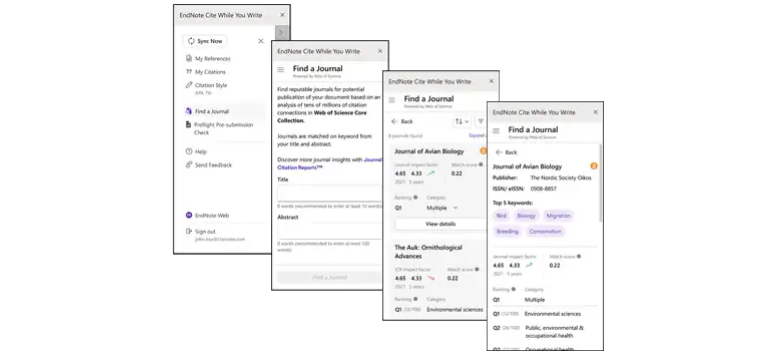
EndNote’s Find a Journal feature takes the guesswork out of choosing where to submit. Using machine learning, it scans key parts of your manuscript like your title, abstract, keywords, and references, then suggests journals that align with your research focus and scope.
Recommendations are backed by Web of Science data and Journal Citation Reports, so you’re not just getting matches, you’re getting credible options with real impact insights. Built into the Cite While You Write plugin for Google Docs and Microsoft Word Online, it fits right into your writing flow without extra steps.
-
Smart journal matching based on your manuscript content
-
Access to impact metrics and credibility indicators
-
Helps reduce mismatched submissions and rejections
-
Available directly while writing in online tools
Narrow down your best publication options faster with EndNote’s intelligent journal matching tools.
Cite from PDF — Turn Highlights into Ready-to-Use Citations
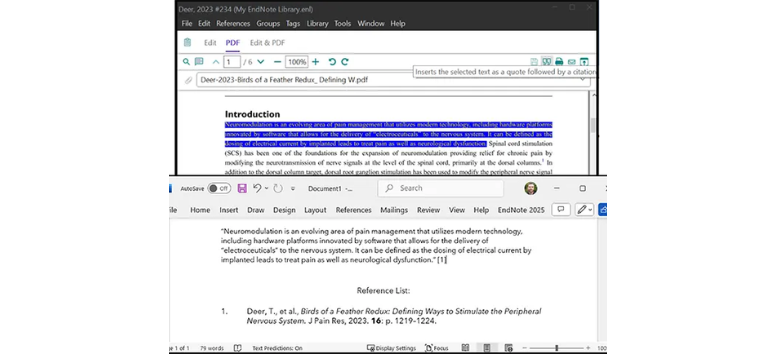
Working through PDFs becomes much more direct when your notes and citations stay connected. EndNote 2025 lets you pull highlighted text from a document and insert it straight into your paper, complete with its corresponding citation, so you don’t have to rebuild references manually.
Behind the scenes, it reads embedded metadata like DOI, author names, and publication details to generate accurate entries. You can drag and drop PDFs into your library, annotate them, and keep everything organised in one place while you write.
-
Insert highlighted quotes with citations in one step
-
Automatically extract metadata from PDFs
-
Drag and drop files to build your library quickly
-
Annotate and organise research within each document
Streamline your writing process by turning your PDF notes into fully cited content with EndNote.
Find Reference Updates — Keep Your Citations Accurate Over Time
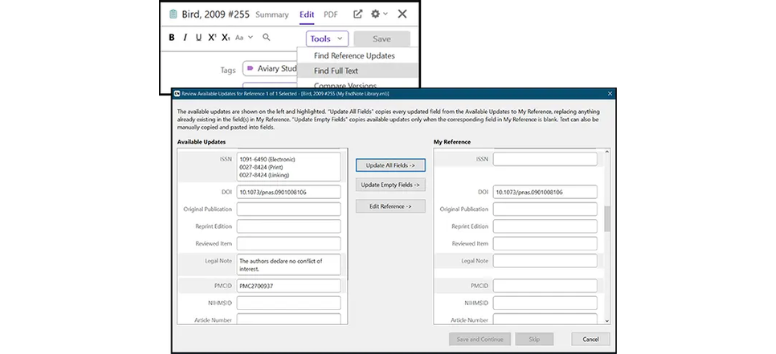
References don’t always stay the same, especially with early-access papers or preprints that get updated later. EndNote’s Find Reference Updates feature checks your library against trusted databases like PubMed and Web of Science, then flags any changes so you can review them without digging manually.
You stay in control of every update. Differences in author names, page numbers, or DOIs are clearly shown, and you decide what to keep. It keeps your citations clean, accurate, and ready for submission without extra backtracking.
-
Compares your references with trusted online databases
-
Highlights updates like DOIs, authors, and publication details
-
Lets you accept or reject changes individually
-
Helps maintain accuracy for evolving research sources
Keep your reference list current and reliable with EndNote’s built-in update tracking.
Find Full-Text — Pull PDFs Straight Into Your Library
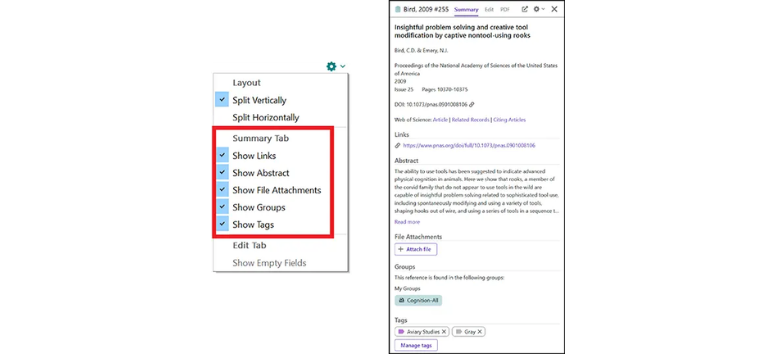
Tracking down full papers can slow everything down, especially when you’re switching between databases and tabs. EndNote’s Find Full-Text feature searches for available PDFs using identifiers like DOI or PubMed ID, then attaches them directly to your reference so everything stays in one place.
Recent updates improve access through institutional subscriptions and open-access sources, which means fewer dead ends and better match accuracy. Once the file is added, you can annotate, highlight, and store notes without leaving your library.
-
Automatically retrieves and attaches full-text PDFs
-
Works with institutional access and open repositories
-
Improved accuracy for faster, reliable matching
-
Supports in-app highlighting and annotation
Bring your references and full-text papers into one organized workspace with EndNote’s full-text retrieval tools.
Redesigned Summary Panel — See What Matters Without Digging
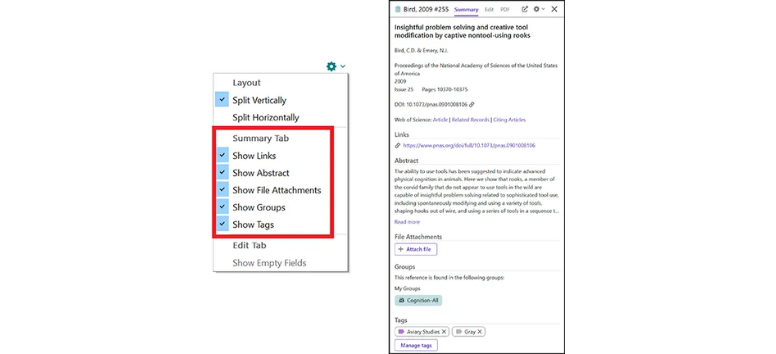
Working with large reference libraries gets easier when key details are clear at a glance. The redesigned Summary Panel organizes article information into a cleaner layout, so authors, titles, DOIs, and journal data are easier to scan without scrolling through cluttered fields.
Navigation feels more direct with tabbed sections for references, notes, and attachments, plus an integrated PDF preview for quick access and annotation. Editing entries takes fewer clicks, and important metadata stands out, making it easier to spot gaps or errors before they cause problems.
-
Clean, structured layout for faster scanning
-
Tabbed sections for quick navigation
-
Integrated PDF preview and annotation
-
Easier editing with clearer metadata display
Stay on top of your references with a clearer, more streamlined view using EndNote’s updated summary panel.
Web of Science Integration — Discover What Connects to Your Research
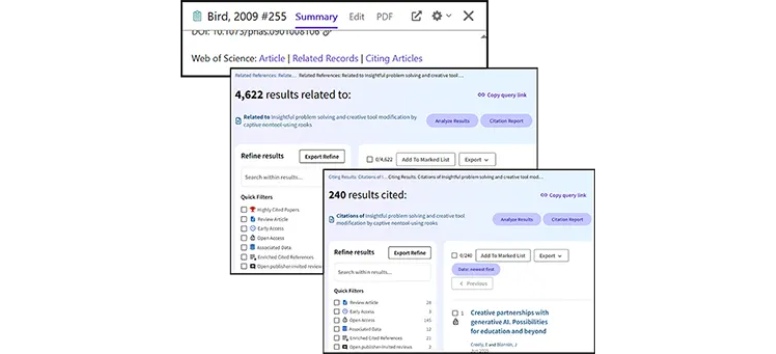
Finding related studies and citation links becomes more direct with Web of Science built into EndNote 2025. You can explore articles closely aligned with your work and see which papers have cited your references, helping you expand your library with relevant, credible sources.
Powered by one of the most trusted citation databases, this feature helps you trace research connections and uncover gaps or supporting studies without leaving your workflow. It turns your reference list into a starting point for deeper discovery.
-
View articles related to your existing references
-
Track papers that cite your sources
-
Expand your library with relevant, high-quality research
-
Powered by Web of Science citation data
Explore deeper connections in your research using EndNote’s Web of Science integration.
How EndNote Takes Pressure Off Your Research Process
Time-Saving — Less Formatting, More Writing
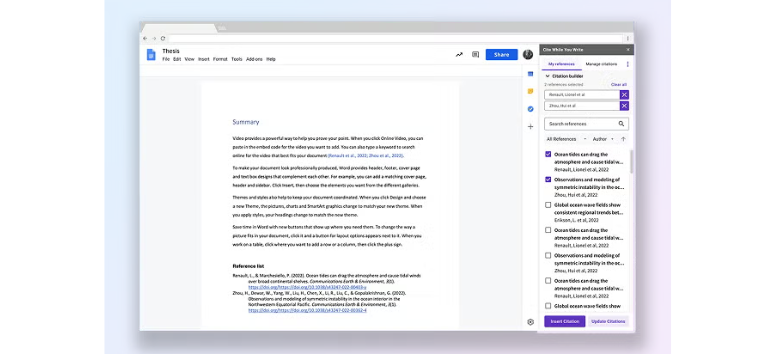
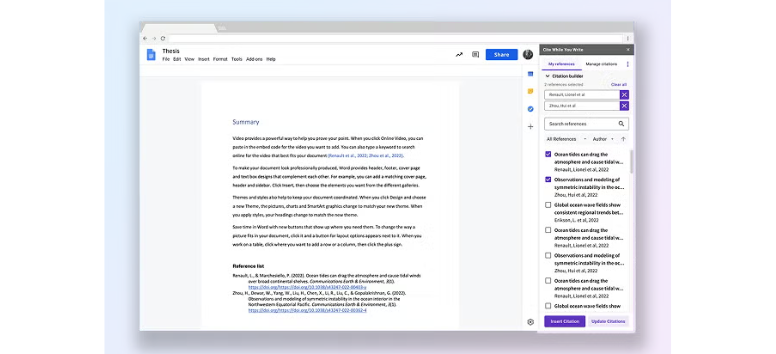
Managing citations manually eats into time that should go into analysis and writing. EndNote connects directly with your word processor through Cite While You Write, so references and bibliographies build themselves as you go. Importing sources from databases and pulling data from PDFs also cuts down repetitive tasks.
-
Insert citations and generate bibliographies instantly
-
Import references directly from major databases
-
Build your library from PDFs without manual entry
Spend more time developing your ideas and less time fixing citations with EndNote.
Accuracy — Clean, Consistent, Submission-Ready
Small citation errors can create bigger problems during submission. EndNote reduces that risk by pulling metadata directly from trusted sources and keeping formatting consistent across your entire document. Updates to references are also easy to track, especially for evolving research like preprints.
-
Pulls accurate data from publishers and databases
-
Maintains consistent formatting across styles
-
Updates references as publication details change
Submit your work with confidence using EndNote’s precision-driven citation tools.
Flexibility — Works Across Styles, Tools, and Setups
Different disciplines, journals, and institutions follow different rules, and EndNote adapts without forcing you to adjust your workflow. With thousands of citation styles and the ability to customise them, it fits a wide range of academic requirements while staying easy to use across platforms.
-
Supports over 7,000 citation styles
-
Customise formats for specific journals or institutions
-
Works across Windows, Mac, and online writing tools
Adjust your citations to fit any requirement without reworking your entire document.
Scalability — From Solo Work to Team Projects
Research doesn’t always stay small. EndNote scales from individual use to larger collaborations, making it easier to manage shared references across teams or departments. Libraries can grow without becoming difficult to organise, even as projects expand.
-
Manage personal or shared reference libraries
-
Collaborate with research teams
-
Suitable for academic, institutional, or editorial use
Handle growing research projects without losing structure or control.
Professional Credibility — Built for Real Academic Standards
Publishing isn’t just about strong ideas; it’s also about meeting the right standards. EndNote supports that by aligning your work with journal requirements and helping you choose suitable publication options. Backed by Clarivate, it carries credibility that’s already recognised across academic institutions.
-
Helps match your work with suitable journals
-
Aligns with established academic standards
-
Trusted by universities and research institutions worldwide
Strengthen the quality and presentation of your research with EndNote.
to generating accurate citations, it reduces manual work that slows research and helps keep everything aligned from draft to submission.
Its strong presence across universities, research institutions, and publishing workflows speaks to its reliability over time. For anyone handling serious academic work, it remains a practical choice that supports both efficiency and credibility.
Explore how EndNote can support your next research project and make your writing process easier to manage from start to finish.