10 Best Squarespace Templates for Small Businesses and Creators in 2026
 By Noah Roni
 Software
The final months of the year are a smart time to launch or refresh your website. If you're building a freelance portfolio, service business, online store, consulting practice, creator brand, or side project, getting your online presence ready before January can leave you with one less major task when the new year begins.
Choosing a starting design is one of the first decisions you'll make. Squarespace offers a large collection of professionally designed templates, but there’s an important detail to understand first: in Squarespace 7.1, templates act as starting designs rather than separate feature sets. All 7.1 sites share the same core template family, style options, fonts, colors, and general customization capabilities. What changes is the layout, demo content, and initial visual direction you start with.
That means the best Squarespace template isn't simply the one with the nicest demo photos. It's the one whose starting structure gets you closer to the website you actually want to build.
Browse Squarespace templates and choose a starting layout that already supports the way you want visitors to explore your business.
How to Choose a Squarespace Template
GET STARTED
Ease of Setup
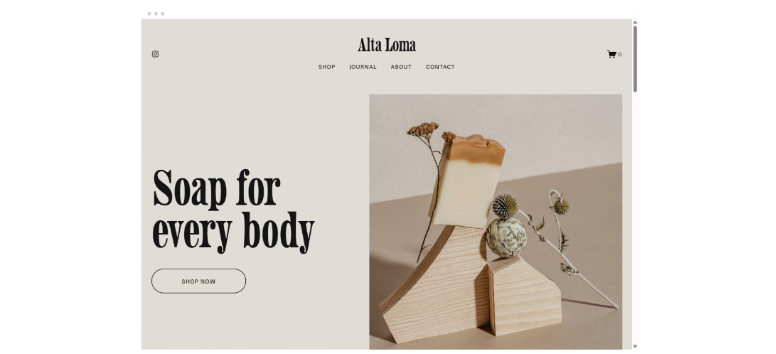
Start with a template that already resembles the website you want to build. A similar page structure means less rearranging later, which can speed up setup. Look at the homepage, navigation, and included sections first. Colors, fonts, and images can all be customized after you choose the basic layout.
Homepage Structure
Your homepage should support the main action you want visitors to take. Service businesses might prioritize clear offers and inquiry buttons, while online stores need strong product visibility. Creators may need featured work or recent content. Choose a template whose homepage already places your most important information where visitors can find it quickly.
Available Demo Pages
Review the pages included in each template demo before making your choice. Useful starting pages may include About, Services, Portfolio, Blog, Shop, Contact, or Classes. You can add and remove pages later, but starting with a structure close to your needs can reduce setup time and keep the site organized.
Image Requirements
Think about the visual assets you already have. Some Squarespace templates rely on large photography, galleries, or full-width banners, while others work well with fewer images and stronger typography. If you don’t have professional photos yet, a less image-heavy layout can be easier to launch without leaving the design feeling unfinished.

GET STARTED
Navigation
Good navigation helps visitors understand where to go next. Look for a template with a menu structure that suits the number of pages you plan to publish. Keep important destinations such as Services, Shop, Portfolio, About, and Contact easy to reach, rather than making visitors dig through several layers of navigation.
Product or Service Presentation
Consider how the template introduces what you sell. Service businesses need enough room to explain offers, pricing, or processes, while ecommerce sites need layouts that make products easy to browse. Choose a starting design that gives your most important products or services clear space instead of forcing them into an awkward structure.
Calls to Action
Look for natural places to guide visitors toward the next step. That could include booking a consultation, buying a product, joining an email list, requesting a quote, or viewing a portfolio. A useful template makes these actions easy to spot without filling every section with buttons or competing messages.
Mobile Layout
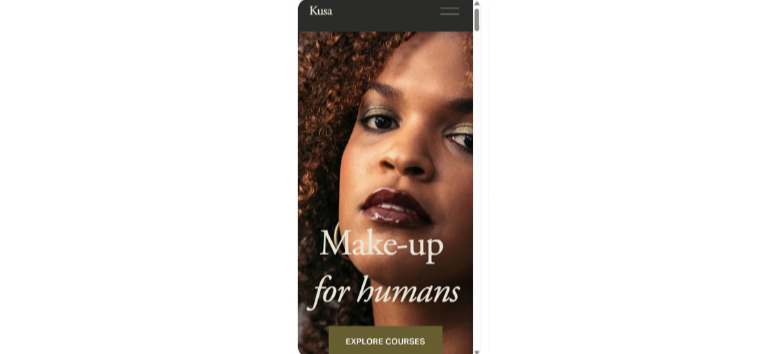
Always consider how the finished site will work on a smaller screen. Squarespace uses responsive design, but long headings, oversized images, and complex sections can still need adjustment after customization. Preview key pages on mobile and check navigation, buttons, forms, images, and text before publishing your site.
Blog or Portfolio Needs
Creators, consultants, photographers, and writers should think beyond the homepage. If you plan to publish regularly or build a large body of work, look at how the template organizes articles, projects, galleries, or case studies. A clear archive makes it easier for visitors to explore older content as your site grows.
Ecommerce Requirements
If selling online is part of your plan, look for a starting layout that gives products plenty of visibility and supports a simple shopping journey. Product grids, promotional sections, category links, and strong purchase CTAs can save setup work. Your available ecommerce features will still depend on the Squarespace plan you choose.
10 Best Squarespace Templates for Small Businesses and Creators
Here’s a quick comparison before we get into each template:
|
Template
|
Best for
|
Starting style
|
Main website goal
|
|---|---|---|---|
|
Talva
|
Photographers and visual creatives
|
Minimal, image-led
|
Showcase work
|
|
Nolan
|
Agencies and professional services
|
Structured, portfolio-driven
|
Generate inquiries
|
|
Forma
|
Coaches and service businesses
|
Clean, conversion-friendly
|
Promote services
|
|
Paloma
|
Podcasters and content creators
|
Editorial, content-first
|
Grow an audience
|
|
Crosby
|
Product brands and small stores
|
Bold, visual ecommerce
|
Sell products
|
|
Manual
|
Focused launches and one-page sites
|
Compact, direct
|
Promote one offer
|
|
Colima
|
Classes, wellness, and appointment businesses
|
Calm, schedule-friendly
|
Drive bookings
|
|
Roseti
|
Nonprofits and community organizations
|
Informational
|
Share programs and updates
|
|
Reflect
|
Portfolios and visual creators
|
Image-led
|
Showcase projects
|
|
Iduma
|
Restaurants, cafés, and hospitality
|
Editorial restaurant design
|
Present menus and encourage visits
|
Talva: Best for Photographers and Visual Creatives
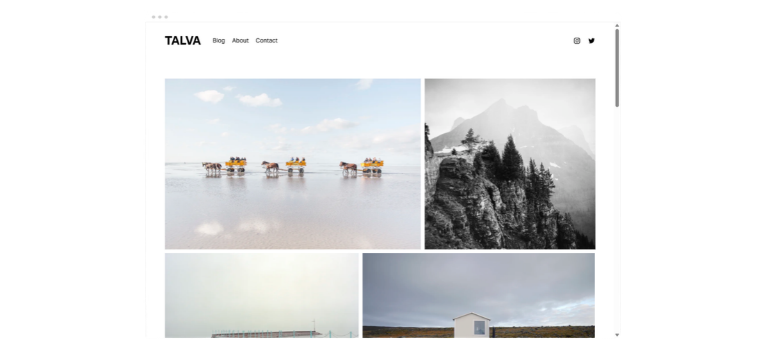
Talva is a strong starting point when your work should take center stage. Its minimalist, image-led layout gives photography and creative projects plenty of room without surrounding them with excessive design elements. Squarespace currently includes Talva in its photography and portfolio template collections.
Photographers, artists, designers, and other visual professionals can adapt it into a portfolio with project galleries, an About page, client information, testimonials, and a clear contact path. The design works best when you already have a solid library of high-quality imagery.
Useful Squarespace tools for this site type include inquiry forms, scheduling, email campaigns, and lead capture forms. These are platform tools rather than Talva-exclusive features, so availability can depend on your plan or additional Squarespace products.
A little preparation goes a long way here. Organize your strongest projects before you begin instead of filling every gallery simply because space is available.
Nolan: Best for Agencies, Consultants, and Service Providers
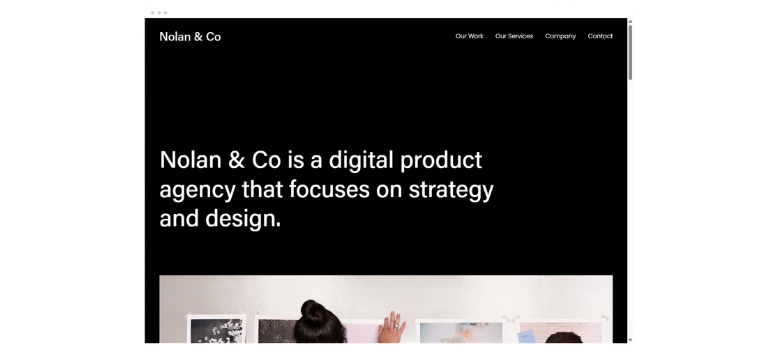
Nolan suits businesses that need to explain expertise before asking visitors to get in touch. Its structured presentation works well for professional services, portfolio work, case studies, team introductions, testimonials, and inquiry-focused pages.
An agency could use individual sections for services and client projects, while a consultant could turn the same structure into expertise areas, case studies, and consultation CTAs. Clear organization matters more than flashy visuals here.
Useful additions include contact forms, appointment scheduling, email capture, and supported customer-management integrations.
Avoid placing every service into one long block of copy. Give generous offers their own section or page so potential clients can understand what you do without digging.
Forma: Best for Coaches and Service-Based Businesses

Forma offers a polished starting point for businesses built around expertise, services, or a defined offer. Squarespace currently lists Forma among its professional services templates, which makes it a practical option for coaches, consultants, educators, and other service-led brands.
Use its structure to introduce an offer, explain how it works, share your background, add social proof, and direct visitors toward a consultation, enrollment page, or lead form. It can also work for creators promoting programs or educational services once the demo content is replaced.
Useful Squarespace tools to consider include scheduling, email campaigns, member content, and lead-generation forms. Some of these products or features can require separate subscriptions or eligible plans.
Keep the path to action simple. Visitors should know what you're offering, who it is for, and where to click next within the first few sections.
Paloma: Best for Podcasters, Writers, and Content Creators
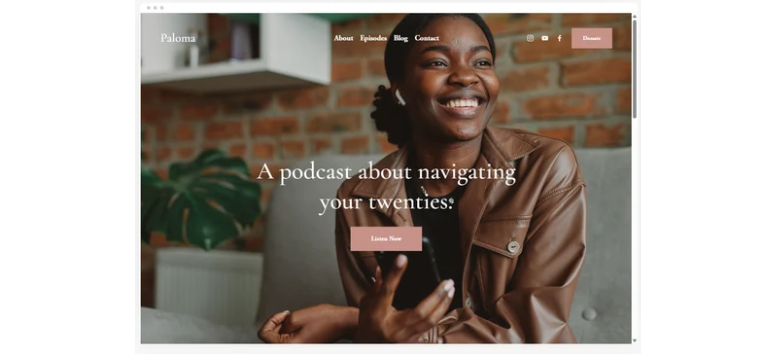
Paloma is built around content discovery. Its editorial structure makes it a natural starting point for podcasts, writers, newsletters, blogs, and creator-led brands with a growing archive.
You can organize episodes or articles, feature recent content, introduce the creator or team, and place newsletter signup opportunities throughout the site. The layout also lends itself well to resource libraries or recurring publishing.
Useful tools include email campaigns, audio or podcast embeds, social links, and membership features. These come from the Squarespace platform rather than Paloma alone.
The main challenge is organization. Decide how you'll categorize episodes, articles, or resources before the archive becomes large. A clear content system is much easier to build early than repair later.
Crosby: Best for Product Launches and Visual Brands
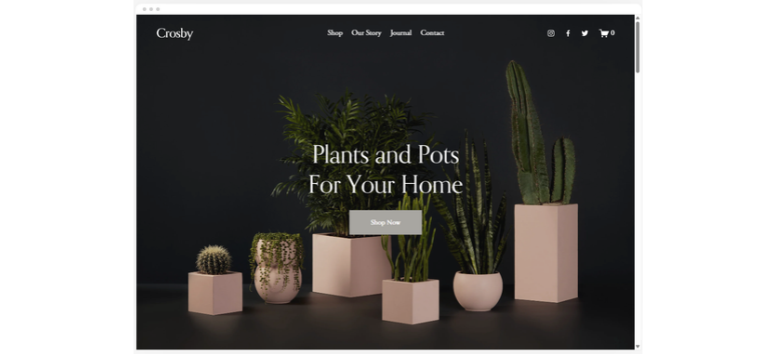
Crosby is one of the stronger options in this list for product-led websites. Its starting design places strong imagery and product merchandising near the center of the experience, making it suitable for smaller ecommerce brands and focused product collections.
Use the homepage to introduce your products, organize categories, tell the brand story, feature editorial content, and lead shoppers toward the store. It works especially well for smaller catalogs where strong photography can carry much of the presentation.
Useful Squarespace tools include product pages, ecommerce checkout, email campaigns, promotional pop-ups, and discount tools, subject to your selected plan.
Crosby asks a lot from your visuals. If your product photography is inconsistent, spend time correcting that before launch. Large image sections tend to amplify weak images just as quickly as strong ones.
Manual: Best for Focused Launches and One-Page Websites
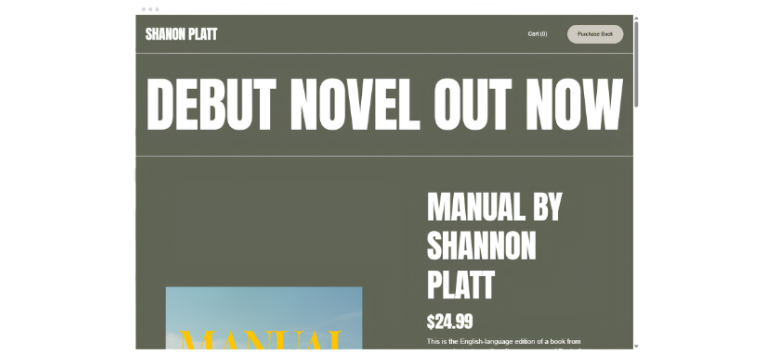
Manual is a good starting point when you don't need a sprawling website. Its compact structure can work well for focused launches, individual products, books, events, or campaign sites where you want visitors to concentrate on one offer.
A streamlined page can move from a hero section into product or offer details, testimonials, creator information, and one strong CTA. That keeps visitors focused instead of sending them through a complex menu.
Useful additions include email signup forms, product checkout, event information, and lead capture.
Resist the temptation to turn a focused design into a ten-page corporate site. Manual works best when the visitor has one primary thing to understand and one main action to take.
Colima: Best for Classes, Wellness, and Appointment-Based Businesses
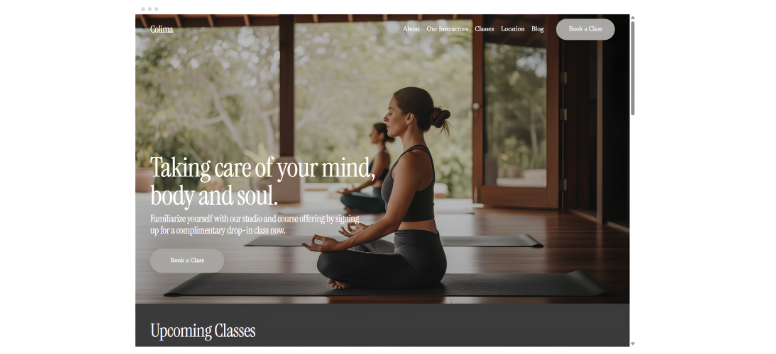
Colima works well for yoga studios, fitness instructors, wellness providers, workshops, and other businesses where visitors need to understand what is offered and then book or inquire. Its demo structure lends itself naturally to classes, instructor information, schedules, and prominent booking paths.
Useful Squarespace tools include Squarespace Scheduling, email campaigns, class information, contact forms, and blog content.
The key here is accessibility. Keep schedules, pricing, location details, and booking links easy to find. People visiting a class or wellness site often arrive with a practical question, so hiding those details behind several pages can slow them down.
Roseti: Best for Nonprofits and Community Organizations
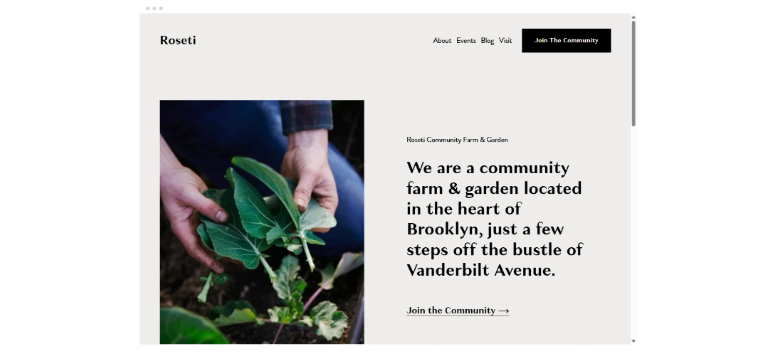
Roseti is a strong starting point for mission-led organizations. Its informational structure can support nonprofits, community groups, neighborhood organizations, associations, and other groups that need to communicate programs, updates, and ways to participate.
You can adapt the layout to explain your organization, highlight programs, share community resources, publish news, promote events, and point visitors toward contact or donation options.
Useful Squarespace tools include newsletters, contact forms, event content, blogging, and donation features.
Build the site around visitor intent. Someone looking for an upcoming event should not need to follow the same path as someone trying to understand your mission or find a way to support the organization.
Reflect: Best for Portfolios and Visual Creators

Reflect is designed for work that needs to be seen. Its image-led structure makes it a strong starting point for photographers, designers, artists, architects, and other creators who rely on visual portfolios or case studies.
Use galleries for your strongest work, then support them with project details, case studies, an About page, and a straightforward inquiry path. Don't assume images can tell the whole story. Short explanations of the problem, process, or outcome can turn a gallery into a much stronger professional portfolio.
Useful additions include inquiry forms, testimonials, scheduling, and email signup tools.
Prepare your images before building. Consistent dimensions and thoughtful project descriptions can make the finished site feel far more intentional.
Iduma: Best for Restaurants, Cafés, and Hospitality Businesses
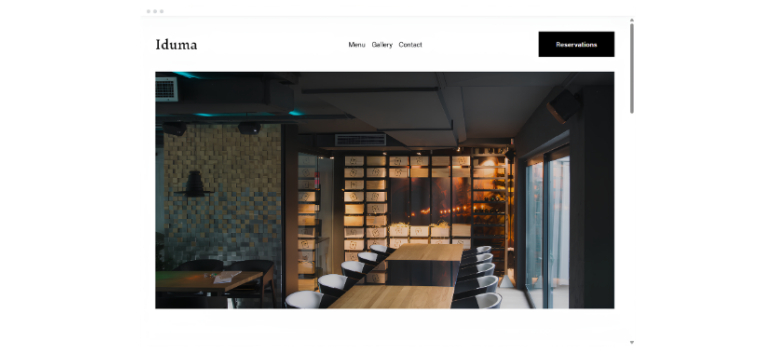
Iduma works best for restaurants, cafés, and hospitality brands. Its starting design is built around food imagery and practical restaurant information, giving businesses room for menus, locations, featured dishes, and dining details.
Restaurants and cafés can adapt the layout for menus, opening hours, location details, photography, announcements, and reservation links. Caterers or hospitality brands can also repurpose the same structure around services and events.
Useful Squarespace tools include menus, contact forms, maps, reservation links, email marketing, and ecommerce features for businesses selling products or gift cards.
Keep the practical details prominent. Visitors looking for a restaurant often want the menu, hours, address, and booking information before anything else.
Can You Sell Online With These Squarespace Templates?
Yes. On Squarespace 7.1, your starting template does not determine whether your site can use ecommerce features. Current 7.1 sites share the same underlying template family, while selling features and transaction terms depend on your Squarespace plan.
Squarespace’s current website billing lineup includes Basic, Core, Plus, and Advanced plans. Ecommerce capabilities, transaction fees, and advanced selling features differ across those plans.
Depending on your plan and the type of business you're running, Squarespace supports selling physical products, digital products, services, subscriptions, and gift cards. Other commerce tools can include customer accounts, discounts, shipping options, payment processing, and inventory features.
Because Squarespace updates its plans and fees, check the current pricing comparison before deciding which subscription you need.
Explore Squarespace ecommerce options and compare the current plans before setting up your store.
Domains and Business Tools to Consider
A professional website takes more than a good starting layout. Your template handles part of the presentation, but you'll also need to think about the tools behind the site.
Common additions include a custom domain, business email, contact forms, analytics, invoicing, email campaigns, appointment scheduling, social profiles, SEO settings, and payment processing.
Some tools are included with eligible website plans, while others can require an additional subscription. For example, Squarespace Email Campaigns and Scheduling are separate products in many setups, so account for those costs before building your workflow around them.
For domains, Squarespace currently offers one eligible custom domain free for the first year with qualifying annual website plans. After the free period, the domain renews at its standard rate.
How to Launch Your Squarespace Website Before 2027
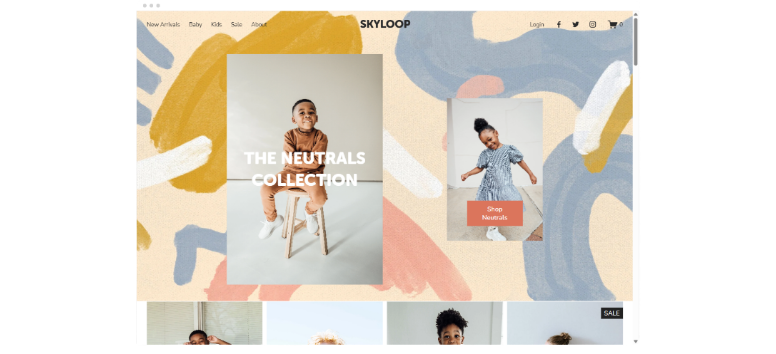
A good template can shorten the setup process, but it doesn't remove the need for a proper launch check.
Use this practical Q4 checklist:
- Choose a starting template based on structure.
- Add your business name, logo, colors, and fonts.
- Remove or replace all demo text and images.
- Build the essential pages for your business.
- Add services, products, projects, or content.
- Connect your custom domain.
- Configure forms, scheduling, payments, or checkout tools.
- Write unique SEO titles and meta descriptions for important pages.
- Check buttons, forms, navigation, and external links.
- Preview the site on desktop and mobile.
- Test checkout if you're selling online.
- Publish the website.
Squarespace lets you continue changing sections, page layouts, fonts, colors, images, and other design elements after you start from a template. In version 7.1, you don't switch templates in the traditional 7.0 sense. Instead, you restyle and restructure the site using the shared 7.1 design system.
Start building with Squarespace and use your chosen template as a foundation rather than treating the demo design as a finished website.
The best Squarespace templates aren't necessarily the ones with the most impressive demo photography or trendy color palette. A stronger choice is the design whose structure already resembles the website you need. Talva and Reflect give visual creators a head start, Nolan supports service-focused sites, Crosby provides a strong ecommerce foundation, Colima works well for appointment-led businesses, and Iduma gives restaurants a practical place to begin.
Squarespace 7.1 also gives you plenty of room to change direction after setup. Your starting template doesn't lock you into its demo colors, images, fonts, or exact page arrangement, and all 7.1 sites share the same core template system. Choose the layout that saves you the most setup work, replace the demo content with your own, and build around the actions you want visitors to take. Browse Squarespace templates and start shaping a professional website you can take into 2027.