10 Best PicWish AI Photo Editing Tools for Product Photos, Social Media and More
 By Gabi Thompson
 Software
PicWish brings a range of AI-powered photo editing tools into one platform, making common image tasks easier to handle. You can remove backgrounds, improve image quality, prepare product photos, create social content, and clean up personal images without relying on complex editing software. It’s a practical option for sellers, marketers, content creators, and casual users who need polished visuals with less manual work.
Each tool serves a different purpose, so the right choice depends on the image and the result you need. Access limits, credit requirements, and export options can also vary. Explore the PicWish tools that fit your projects and start editing with a clearer workflow.
What Is PicWish?
PicWish is an AI-powered photo-editing platform designed for quick, everyday image work. Its web-based tools let you edit directly in your browser, while desktop and mobile apps are available for Windows, macOS, iOS, and Android. AI handles much of the processing, helping reduce the manual work involved in common photo-editing tasks.
The platform can support personal photos, product images, social media content, marketing visuals, and other routine creative projects. It can work well for casual users, content creators, e-commerce sellers, marketers, and small businesses that need to prepare images without relying on complex editing software.
PicWish offers free access to selected tools with usage and download limits. Paid subscriptions and credit-based options provide access to additional processing, HD exports, and premium features. Check the available plan, credit requirements, and export options before starting larger projects. Explore PicWish and choose the tools that match your editing needs.
10 PicWish AI Photo Editing Tools to Explore
PicWish Background Remover: Best for Product Photos and Online Selling
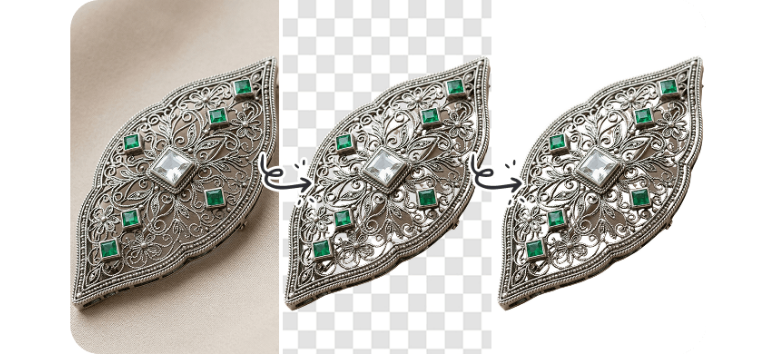
PicWish Background Remover uses AI to isolate the main subject and create a transparent background in a few seconds. It works with product photos, portraits, logos, pet images, signatures, and other graphics. After removal, you can refine edges, adjust lighting, add shadows, crop or resize the image, or replace the background with a new one. Exports are available as transparent PNG or JPG files.
For online sellers, the tool also helps prepare images for marketplaces and social platforms without jumping between several editing programs.
- Resize images for Amazon, eBay, Instagram, and TikTok.
- Add white, transparent, or AI-generated backgrounds to product shots.
- Process up to 100 images at once with the online batch tool.
- Use the desktop version to remove backgrounds from up to 10,000 images in larger projects.
- Access up to 50 free uses per day, according to PicWish’s current product page.
Use PicWish to remove distracting backgrounds and create cleaner product images for your store, listings, and social content.
PicWish AI Photo Enhancer: Best for Sharpening and Upscaling Images
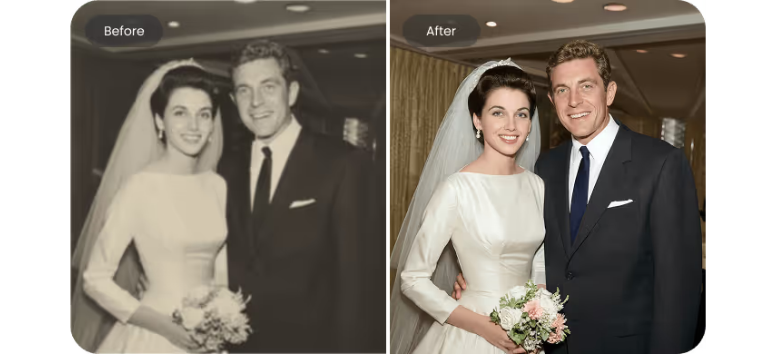
PicWish AI Photo Enhancer uses AI to improve blurry, noisy, or low-resolution images with minimal manual editing. Its standard model reduces grain, sharpens visible details, improves lighting, and upscales images to 4K, with a maximum output size of 4096 pixels. PicWish also provides specialized enhancement options for portraits, anime, text, and older photos.
- Batch Enhancement: Process up to 30 images at once online or up to 10,000 images through the desktop software.
- Old Photo Restoration: Reduce scratches and blur, then add realistic color to black-and-white photos.
- Portrait and Text Enhancement: Sharpen facial details or improve the readability of blurry text while retaining the original image structure.
- Higher-Resolution Options: PicWish also offers an image upscaler that can enlarge compatible images up to 8K and 300 DPI for print-focused projects.
Free users currently receive five standard enhancements per day, while advanced models and higher-resolution processing require paid access. Enhance your photos with PicWish and turn blurry or low-resolution images into clearer, more usable visuals.
PicWish AI Background Generator: Best for Product and Lifestyle Images

PicWish AI Background Generator creates new backgrounds around an uploaded subject using AI. After you upload an image, PicWish can remove the original background and place the product or person into a generated scene. You can select a preset style or describe the background you want with a text prompt, making it useful for product photography, marketing visuals, portraits, and creative projects.
- Create Product Scenes: Generate studio-style or lifestyle backgrounds for cosmetics, accessories, furniture, and other products without arranging a physical shoot.
- Use Text Prompts: Describe the setting you want, then let PicWish generate a matching background around your subject.
- Start With Templates: Browse preset scenes when you need ideas or want a quicker starting point.
- Adjust the Composition: Change the aspect ratio, resize or reposition the subject, and refine the image after generation.
- Create More Than Product Photos: Use generated backgrounds for portraits, promotional graphics, furniture concepts, and other visual projects.
Create a new setting with PicWish and turn a simple subject photo into a polished scene for your store, campaign, or next creative project.
PicWish Object Remover: Best for Cleaning Up Distracting Image Elements
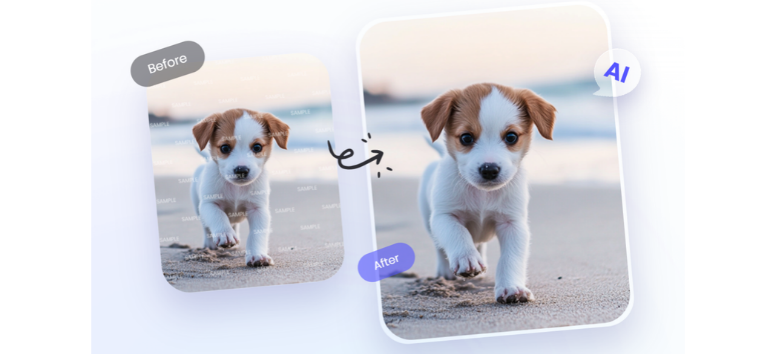
Remove unwanted details from photos with PicWish Object Remover, an AI-powered tool built for quick image cleanup. It can erase passersby, clutter, timestamps, stickers, logos, blemishes, and other distracting elements while filling in the selected area. Automatic mode is designed for text and logo watermarks, while manual mode gives you more control over objects that need precise selection.
- Remove Text Automatically: Let PicWish detect text or logo watermarks and clear them with its auto-removal mode.
- Select Objects Precisely: Use the brush, rectangle, or lasso tools to mark people, small objects, timestamps, blemishes, or other unwanted details before removal.
- Clean Up Different File Types: Upload PNG, JPG, JPEG, WEBP, BMP, JFIF, and HEIC files directly through the online tool.
- Process Several Images at Once: Upload up to 50 images with the online batch feature, select the unwanted areas, and download the processed files together as a ZIP.
- Handle Larger Desktop Jobs: Use PicWish for Windows or Mac to process up to 100 images at once when you need to clean a bigger set of visuals.
Clean up distracting details with PicWish and keep your product photos, portraits, social posts, and other visuals focused on what you want viewers to see.
PicWish AI Art Generator: Best for Turning Text Prompts Into Creative Images
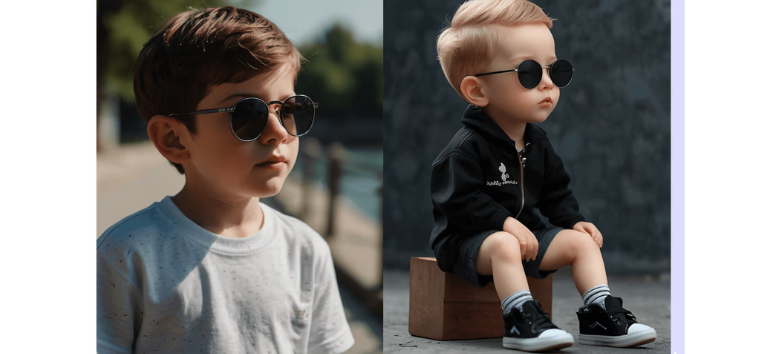
Turn written ideas into original visuals with PicWish AI Art Generator. Enter a text prompt describing the scene, subject, mood, or concept you want, then let the tool generate several image options to choose from. You can also select from styles such as painting, photography, pixel art, 3D, anime, cyberpunk, illustration, digital art, and sketch. PicWish recommends using clear, descriptive prompts to help guide the output.
- Describe Your Idea: Write a prompt of up to 1,000 characters to explain the image you want to create.
- Choose an Art Style: Pick from multiple visual styles to shape the overall look of your generated artwork.
- Generate Multiple Options: Create several results from one idea, then choose the image that works best for your project.
- Use Images for Different Projects: Create visuals for personal or commercial use, including social content, concept art, marketing materials, and design inspiration.
- Check Credit Costs Before Generating: Image generation currently uses 12 to 28 credits per generation, while new users receive five free uses.
Create your next visual with PicWish AI Art Generator and turn a simple text prompt into artwork that fits your idea.
PicWish Old Photo Restoration: Best for Repairing and Reviving Vintage Photos
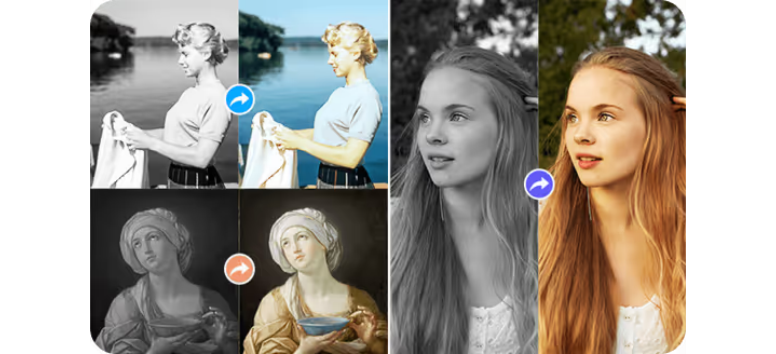
Restore faded, scratched, blurry, or damaged photos with PicWish Old Photo Restoration. The AI-based tool can reduce visible damage, sharpen details, improve faces, add color to black-and-white photos, and enlarge older images for easier viewing or printing. You can also choose Mild, Moderate, or Severe restoration based on the condition of the original photo.
- Repair Visible Damage: Remove scratches, creases, fading, stains, blur, and noise from aging photos.
- Enhance Facial Details: Use AI face enhancement to sharpen blurry faces and recover more visible detail in portraits.
- Add Color to Old Photos: Turn black-and-white family pictures and vintage portraits into colorized versions using AI.
- Upscale for Larger Use: Enlarge restored images by 2x or 4x while reducing noise, blur, and ghosting.
- Refine With Text Prompts: Describe the details you want adjusted after restoration, and PicWish can optimize the image further through AI-assisted editing.
Restore treasured family photos with PicWish and preserve older memories in a clearer, more usable format.
PicWish Photo Colorizer: Best for Adding Color to Black-and-White Photos
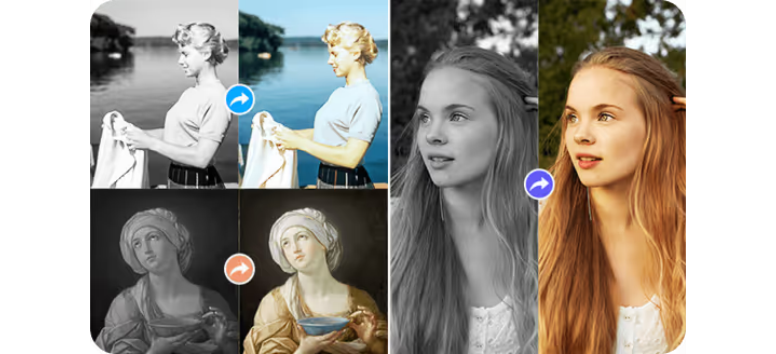
Bring black-and-white photos into color with PicWish Photo Colorizer. The online tool uses AI image-coloring algorithms and deep learning to analyze people, objects, and scenes, then automatically apply natural-looking colors. It works well for family photographs, portraits, archival images, and other monochrome pictures that you want to view in a fresh way. Keep in mind that AI-generated colors are interpretations and may not match the exact original colors of clothing, objects, or surroundings.
- Colorize Photos Automatically: Upload or drag in an image, let PicWish process it, then download the colorized result.
- Work Without Manual Coloring: Let AI handle the color application instead of painting individual areas by hand.
- Process Multiple Images: Colorize up to 30 photos in one online batch when working with a larger collection.
- Handle Bigger Desktop Projects: Use the desktop version to batch edit up to 10,000 images.
- Use the Online Tool for Free: PicWish currently states that its online Photo Colorizer is free to use without usage limits.
Colorize your old photos with PicWish and rediscover familiar memories with a fresh visual perspective.
PicWish AI Image Enlarger: Best for Upscaling Photos for Print and Online Use

Enlarge small or low-resolution images with PicWish AI Image Enlarger and prepare them for product pages, social media, print layouts, and other high-resolution uses. The tool uses AI to increase image dimensions while preserving visible edges, colors, and textures as much as possible. You can upscale by 2x, 4x, 8x, or 16x, with exports reaching up to 48,000 pixels. Final clarity still depends on the quality of the original image.
- Scale Images Up to 16x: Choose 2x, 4x, 8x, or 16x enlargement based on the size and resolution your project needs.
- Export High-Resolution Files: Create outputs up to 48,000 pixels for posters, banners, storefront graphics, and other large-format uses.
- Enlarge in Batches: Process up to 50 images at once, which can help with product catalogs, POD artwork, campaign assets, and listing updates.
- Work With Common File Types: Upload JPG, JPEG, PNG, HEIC, JFIF, or WebP files up to 50 MB each.
- Upscale Different Image Types: Use the tool for product photos, portraits, illustrations, anime, screenshots, AI artwork, and other digital visuals.
Upscale your images with PicWish and prepare clearer, larger files for your next listing, print project, or campaign.
PicWish White Background Tool: Best for Clean Product and E-Commerce Images
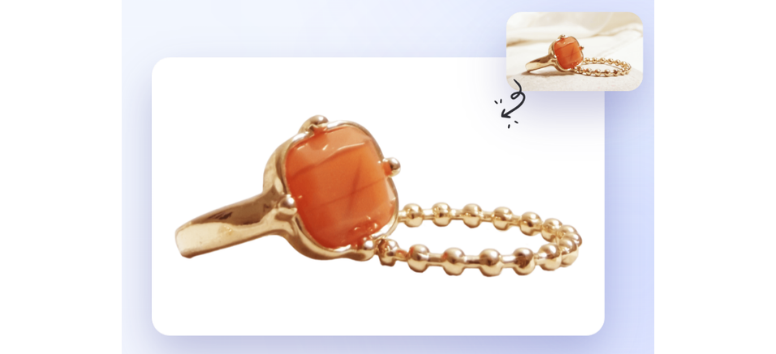
Create clean product photos with PicWish White Background Tool, which automatically removes the existing background and replaces it with white in one step. The online tool is useful for product listings, marketplace images, social posts, and marketing visuals where a simple background helps keep attention on the subject. After processing, you can continue editing the image by adjusting brightness, adding shadows or text, and resizing it for different uses.
- Replace Backgrounds Automatically: Upload, drag, or paste an image and let PicWish add a white background without manual cutouts.
- Process Images in Batches: Upload up to 30 photos at once through the web tool when preparing multiple product images.
- Export in Common Formats: Download finished images as PNG or JPG files.
- Refine Product Photos Further: Adjust lighting, shadows, text, and image size after the white background is applied.
- Prepare E-Commerce Visuals: Resize images for standard marketplace formats and create cleaner product presentations for online stores.
Create polished white-background images with PicWish and prepare your product photos for listings, campaigns, and social content.
PicWish Image Compressor: Best for Reducing File Size Without Extra Editing
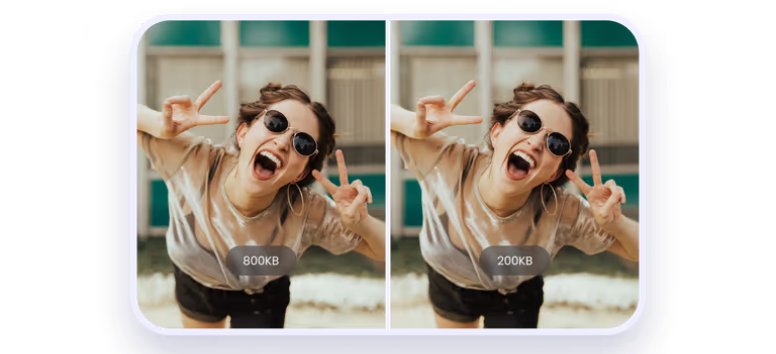
Compress large image files with PicWish Image Compressor when you need smaller files for websites, emails, online stores, or everyday sharing. The browser-based tool supports common formats such as JPG, JPEG, BMP, PNG, and WebP, and PicWish says its compression algorithm is designed to reduce file size while limiting visible quality loss.
- Reduce File Size Quickly: Upload an image and let PicWish compress it online without requiring desktop software.
- Keep Visual Quality in Check: Use AI-assisted compression that aims to balance smaller file sizes with less visible distortion.
- Work With Common Formats: Compress JPG, JPEG, BMP, PNG, WebP, TIFF, GIF, and several other supported image types.
- Prepare Images for the Web: Shrink photos before adding them to websites, emails, product pages, or other places where smaller files can be easier to upload and manage.
- Protect Uploaded Files: PicWish states that processed images are automatically deleted from its server one hour after compression is completed.
Compress your images with PicWish and prepare lighter files for faster uploads, sharing, and online publishing.
Is PicWish Free?
PicWish offers a Free Plan with access to selected tools, free previews for most features, and a limited number of non-HD downloads each day. Some basic editing tools can be used without payment, but advanced processing, higher-quality exports, and certain AI features may require credits or a paid plan.
The Pro Plan includes daily HD downloads for supported online features plus up to 450 credits per month. Those credits can be used for AI and editing tools, while pay-as-you-go credits are also available and remain valid after purchase.
Access rules vary by tool and platform. Output quality, batch processing, HD downloads, and desktop or mobile use can affect what is free and what requires payment.
PicWish stands out as a practical AI photo-editing platform for people who need fast results without a steep learning curve. Its tools cover a wide range of everyday tasks, from removing backgrounds and cleaning up images to restoring old photos, enlarging files, compressing images, and creating new visuals with AI. That makes it useful for e-commerce sellers, marketers, creators, small businesses, and casual users working with photos on a regular basis.
The key is choosing the right tool for the job. Some features are available free, while others require credits, paid exports, or a subscription for higher-quality results and larger workloads. Compare the options, check the current limits, and focus on the tools that match your workflow. Start with PicWish and turn routine photo edits into a faster, more manageable process.